


 19 min read
 Updated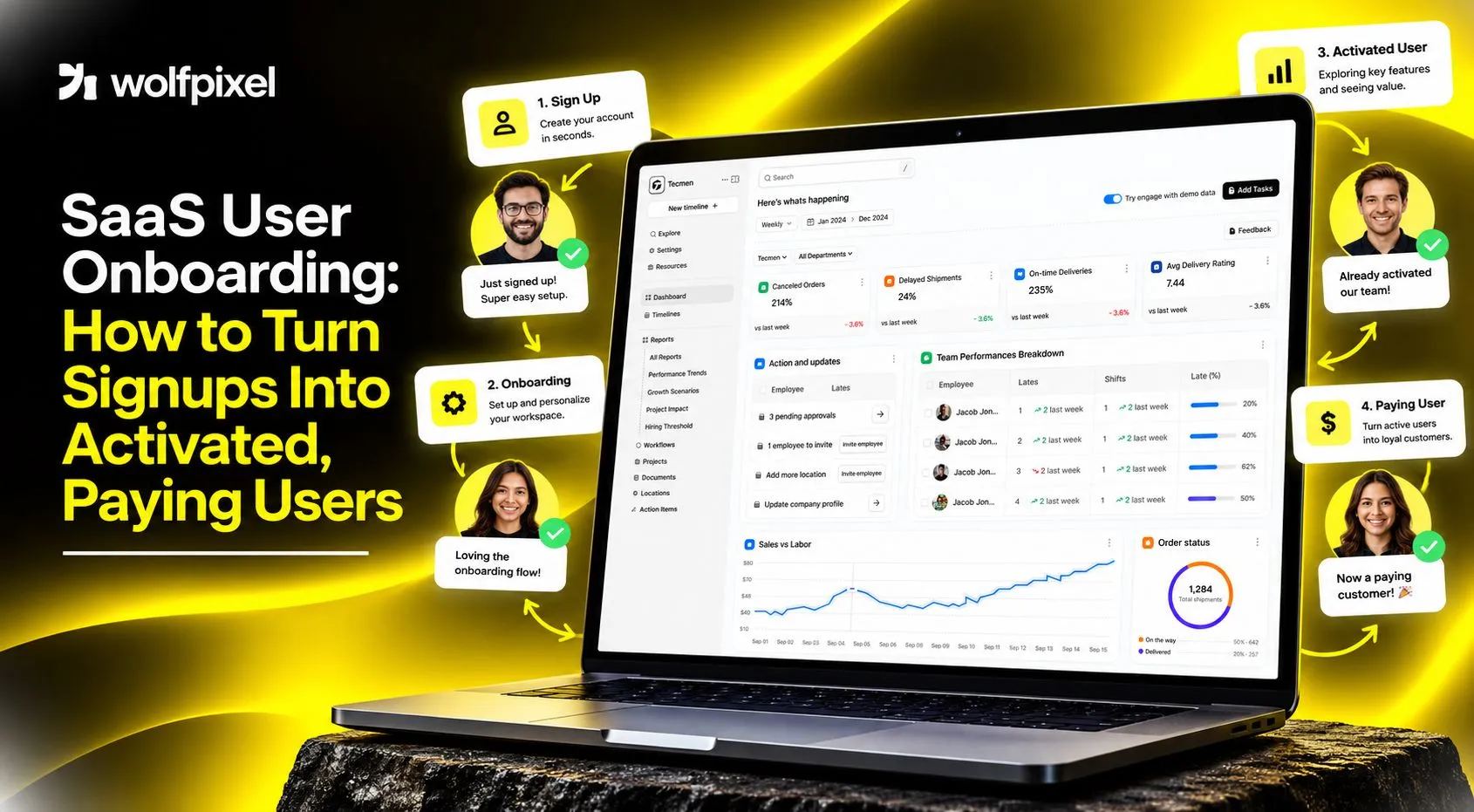
SaaS user onboarding is the guided experience that takes a new signup from account creation to their first meaningful outcome in your product. Strong onboarding works backwards from a clearly defined activation event, removes every step that does not contribute to reaching it, and uses in-product guidance rather than explanation to get people there. The goal is to reduce time to value, so the user experiences the benefit they signed up for before their initial motivation fades.
I’m Maniruzzaman Jubayer, Co-founder & COO and Product Design Specialist at Wolfpixel, with 7 years of experience. I personally oversee website, app, dashboard and digital product design. This guide focuses on SaaS onboarding, activation steps and guiding new users toward product value.
Most SaaS teams do not have an acquisition problem at the top of their funnel. They have a first-session problem. People sign up, land on an empty dashboard, poke around for ninety seconds, and never return. The product may be excellent. The onboarding simply never gave them a reason to find out.
What SaaS User Onboarding Really Means
SaaS user onboarding is the set of experiences that carry a new user from signup to a first real outcome, and then to a habit. It spans the signup form, the first-run experience, empty states, in-app guidance, lifecycle email, and often a human touch from support or customer success.
The most common misunderstanding is treating onboarding as an education problem. Under that framing the job is to explain the product, so teams build tours that point at navigation items and tooltips that name features. Users do not want to learn your product. They want a result. A more useful framing: onboarding is the shortest credible path to proof.
Onboarding is not the same as activation
These terms get used interchangeably, which causes real confusion in planning meetings.
| Term | What it means | Who owns it |
|---|---|---|
| Onboarding | The designed experience guiding a new user | Product and design |
| Activation | The user reaching a defined value milestone | Product, growth |
| Aha moment | The point where the user understands the value | Emerges from user behavior |
| Time to value (TTV) | Elapsed time from signup to that milestone | Product, growth |
Onboarding is the input. Activation is the output. You design the first and measure the second.
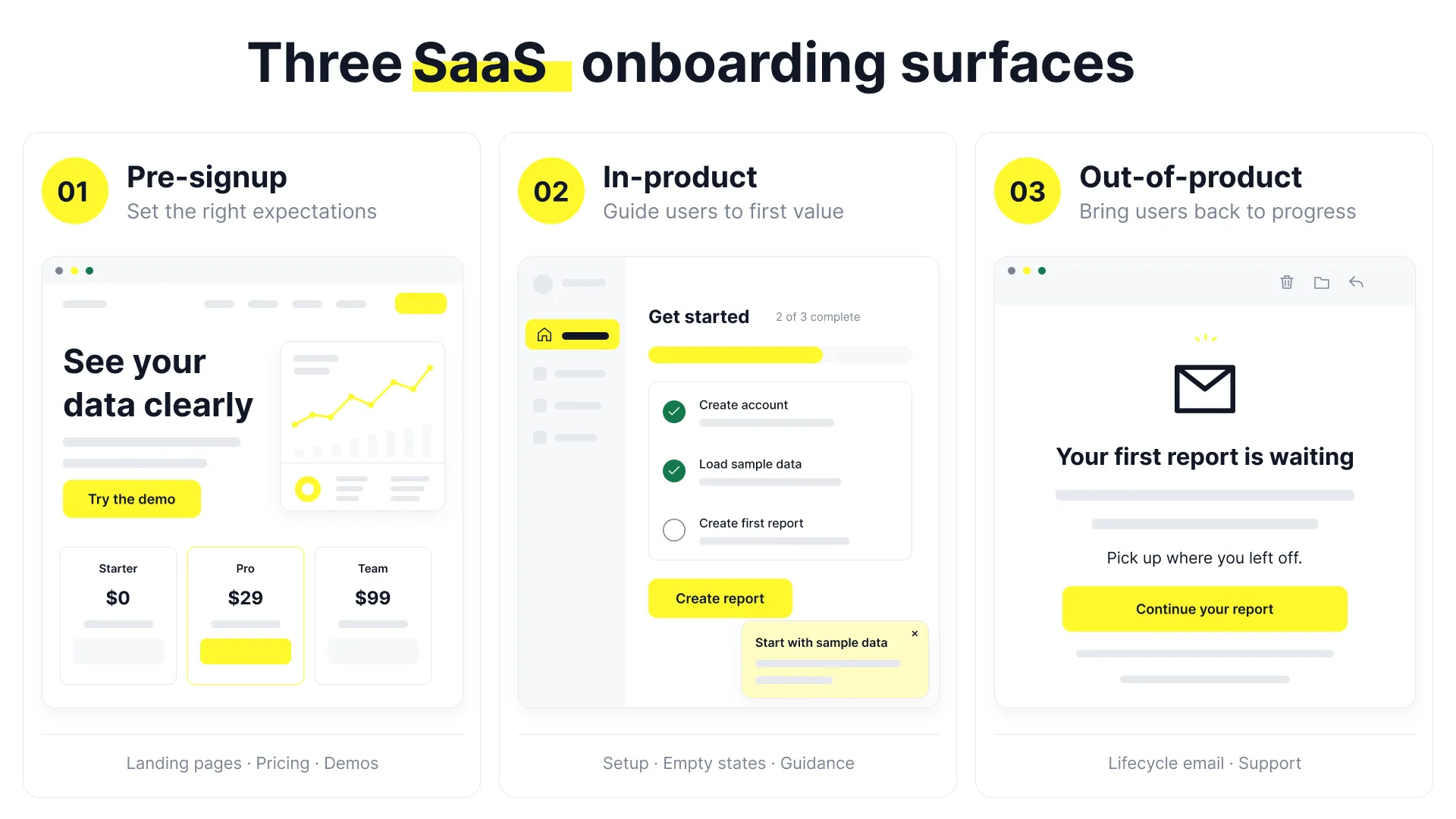
Most teams think about only the second. Pre-signup onboarding covers landing pages, pricing clarity, and interactive demos, and a user who arrives with the wrong expectation is very hard to activate afterwards. In-product onboarding covers the first-run experience, setup steps, empty states, contextual guidance, and the checklist, and is where most of the leverage sits. Out-of-product onboarding covers lifecycle email that brings users back for unfinished steps.
All three need to say the same thing. Onboarding requires deciding what to hide, what to default, what to postpone, and what to insist on, which is why treating it as a copywriting pass over existing screens rarely changes the numbers.
Diagnose Before You Design: Finding the Real Drop-Off
The instinct when activation looks poor is to add guidance. More tooltips, a longer tour, another modal. This almost always makes things worse, because the underlying problem is usually friction or irrelevance, and guidance adds friction on top of friction.
Diagnose first. A proper diagnosis takes about two weeks and does not require new tooling in most cases.
Step 1: Define the activation event before you measure anything
Pick a single behavior that reliably predicts retention, then test the definition against your own data. Take users who did the thing in their first week and users who did not, and compare their retention curves four to eight weeks later. If the curves separate clearly, you have a usable activation event. If they do not, your definition is a vanity milestone.
Good activation events involve the core value of the product rather than a setup chore, are reachable in one session by a motivated user, and are specific enough to instrument without ambiguity. Definitions like “completed signup” measure your form, not your product.
Step 2: Map the current flow honestly
Write down every screen, field, decision, permission prompt, and required input between account creation and the activation event, including ones that appear only for certain plan types. Teams routinely discover their flow has nineteen steps when they believed it had six, because features were added one at a time and nobody looked at the whole path. For each step, record what percentage of users complete it, how long the median user takes, and whether it is required for activation or merely convenient for you.
Step 3: Layer quantitative and qualitative evidence
Funnel analytics tell you where people leave. They never tell you why. Pair them:
| Question | Method | What it reveals |
|---|---|---|
| Where do users drop? | Funnel analysis by step | The problem location |
| Why do they drop? | Session replay of drop-off sessions | Hesitation, confusion, dead ends |
| What did they expect? | Short survey to churned trials | Expectation mismatch |
| What did activated users do differently? | Cohort comparison of event sequences | The path worth designing for |
Watching ten to fifteen session replays of users who abandoned during setup is the highest-value hour most product teams can spend, and it is consistently more informative than another dashboard.
Step 4: Separate the four causes of drop-off
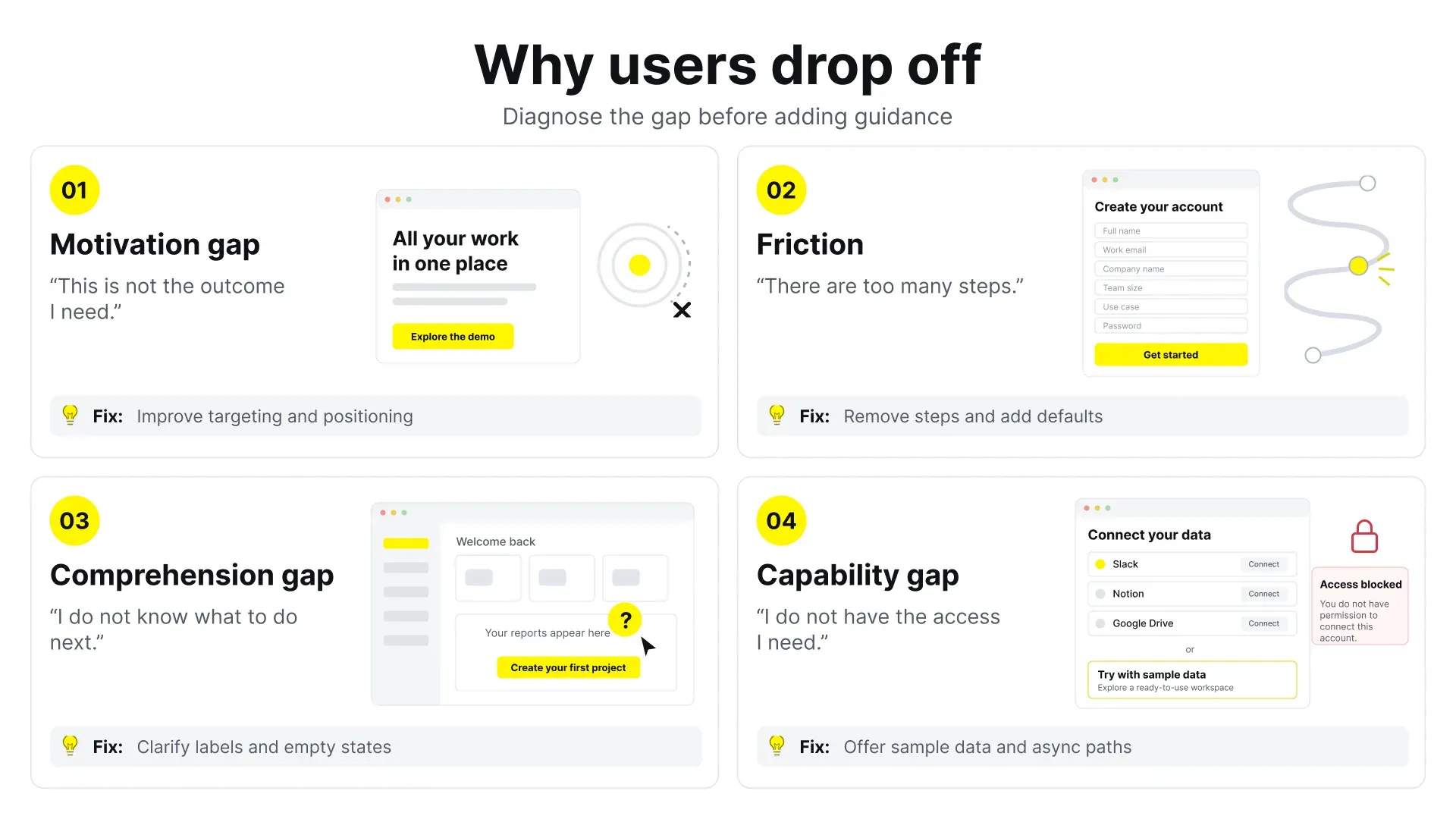
Every abandonment traces back to one of four causes, and each has a different fix. Applying the wrong fix is why redesigns fail.
- Motivation gap. The user never wanted this outcome badly enough. Fix upstream, in targeting and positioning.
- Friction. The path is long, slow, or effortful. Remove steps, add defaults, defer requirements.
- Comprehension gap. The user does not understand what to do next. Fix with better empty states, clearer labels, and in-context guidance.
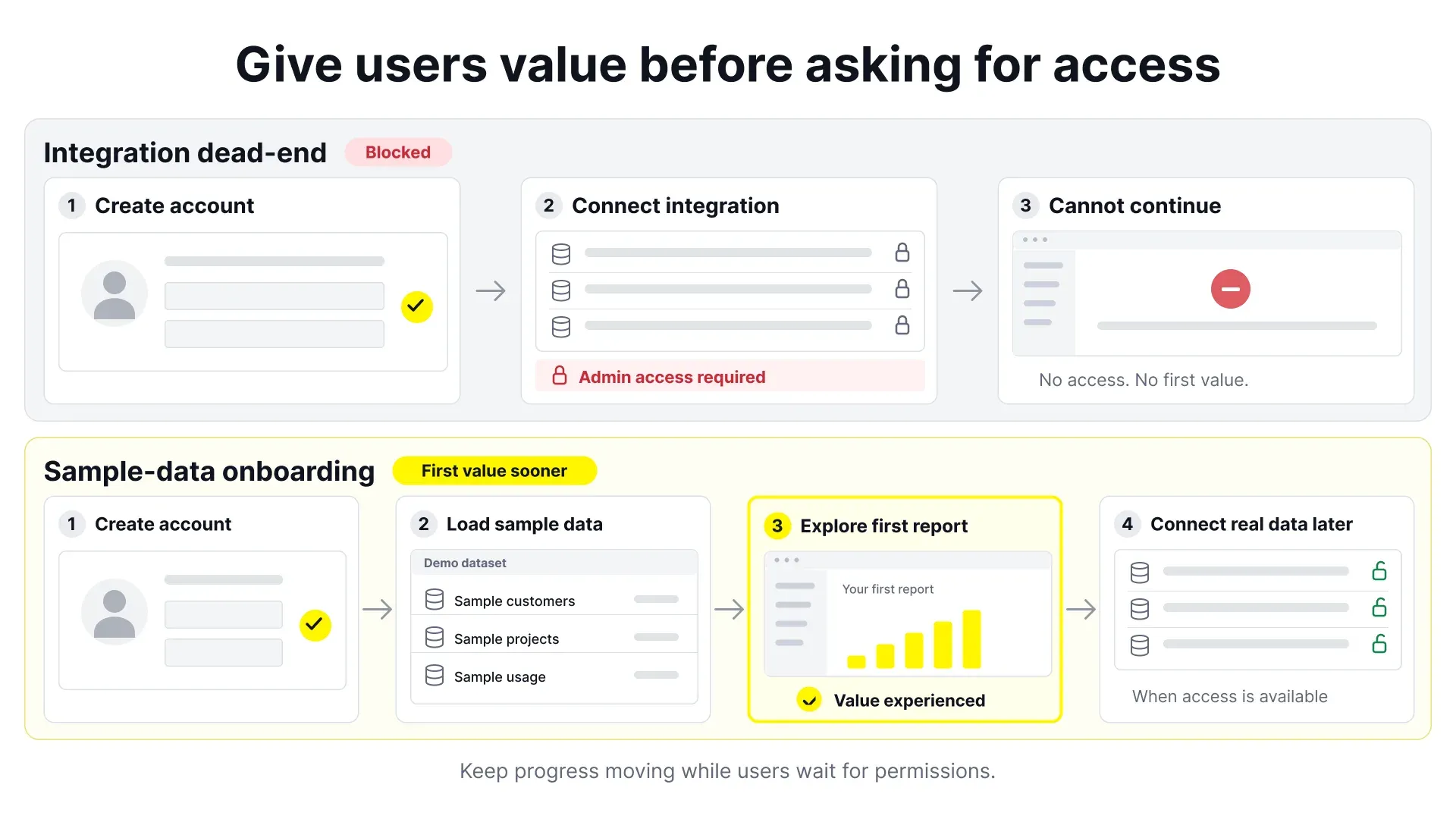
- Capability gap. The user cannot proceed without something they lack, such as admin permissions, API credentials, or colleagues. Fix with sample data and asynchronous paths.
The capability gap is most often misdiagnosed as a comprehension gap. Someone who cannot connect their company’s data warehouse because they lack access does not need a better tooltip. They need a demo dataset.
The Anatomy of a High-Performing SaaS Onboarding Flow
Once you know where the losses are, structure becomes the lever. The following framework holds across most B2B SaaS categories, though the weighting shifts with product complexity.
Step 1: Reduce signup to the minimum viable identity
Every field on a signup form is a chance to leave. Ask only for what you need to create an account. Company size, role, and phone number can be collected later, in-product, once the user has already received something.
- Offer SSO where your audience already has accounts, and put the most likely option first.
- Do not require email verification before the user can do anything. Verify at a later gate.
- If you must gate on a credit card, be explicit and early. Surprising people at step four is worse than filtering them at step one.
Step 2: Ask one or two segmentation questions, and use the answers
A “what brings you here” question is worth including only if the answer changes what happens next. If every user sees an identical experience regardless of what they select, the question is friction disguised as personalization. When you do a segment, keep it to a handful of options mapped to genuinely different jobs, and let the answer drive the template, the sample data, the checklist contents, and the first email.
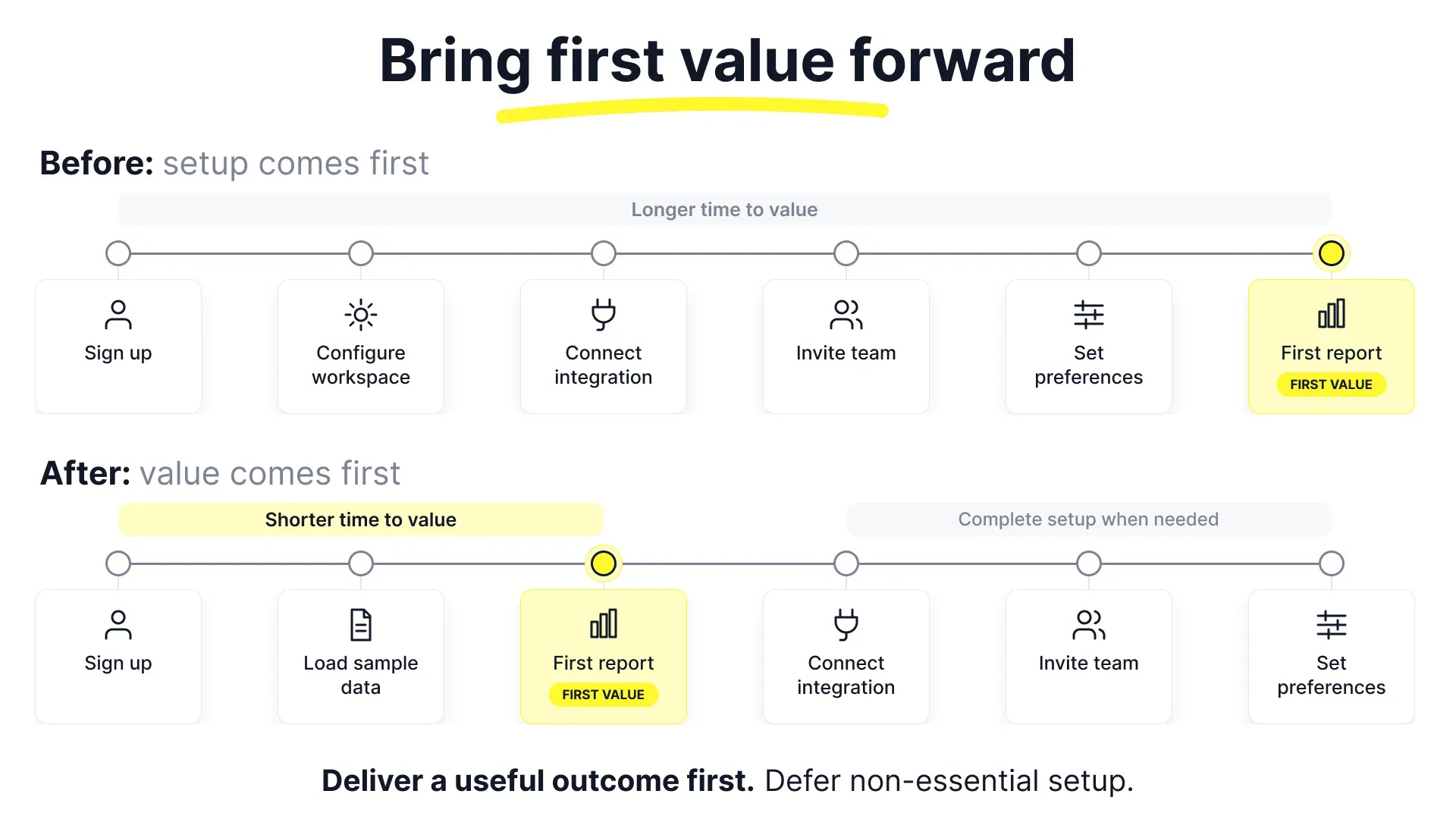
Step 3: Deliver a visible win before asking for setup work
This is the most important sequencing decision in your saas onboarding flow, and the one most commonly inverted. Teams front-load configuration: connect your data, invite your team, import your contacts. All of that is work performed on faith, before the user receives anything. Manufacture an early result instead, and defer configuration until they have a reason to invest.
- Sample or demo data. A populated workspace the user can explore immediately.
- Templates. A starting artifact already most of the way to something useful.
- Instant generation. Take the one input you have, such as a URL or email domain, and produce something personalized from it.
- Read-only preview. Show what the connected version would look like before requiring the connection.
The principle is simple: earn the right to ask for work.
Step 4: Design the empty state as a first-class screen
Empty states are where new users spend their most decisive moments, and they are almost always designed last, under time pressure. A good empty state explains what belongs here in one line, shows what a filled version looks like, offers exactly one primary action, and provides a lower-commitment secondary path such as loading sample content. Give your three or four most important empty states the same attention you give your marketing homepage. The traffic is more qualified.
Step 5: Guide in context, not in advance
Front-loaded product tours arrive before the user has any question, so the information has nothing to attach to and is forgotten immediately. Contextual guidance appears at the moment of need. A useful hierarchy, from least to most intrusive:
- Clear labels and microcopy that make guidance unnecessary
- Inline hints and helper text within the interface
- Empty-state instruction at the point of first use
- Contextual tooltips triggered by reaching a specific screen
- A persistent checklist the user opens on their own terms
- A modal that interrupts
Move down this list only when the level above genuinely cannot carry the message. Most products reach level six first.
Step 6: Design the return, then the exit
Activation rarely completes in one sitting, especially in B2B products where the user must gather information or coordinate with colleagues. Save partial progress and restore it visibly, and send a lifecycle email that resumes the specific abandoned step rather than a generic welcome. A user who comes back has already seen the introduction, so the returning experience should differ from the first.
Onboarding also needs an ending. Once the user has activated, dismiss the checklist, stop the setup emails, and let the product become the product. Guidance that never goes away reads as clutter and trains users to ignore your in-app messaging, which fails you later when you have something important to say.
The steps hold across categories. What shifts is emphasis: collaboration products need solo value before the invite, data-dependent products need sample data and an asynchronous connection path, and enterprise platforms need guided setup alongside human assistance.
SaaS Onboarding Best Practices and User Onboarding UX Principles
The practices below are durable. They apply whether you are a two-person team shipping your first onboarding or a scaled product org running continuous experiments.
Design for the job, not the feature set
Users adopt products to make progress on something. Onboarding that walks through features in the order your navigation lists them ignores this. Structure the first session around a complete job the user came to do, even a small one, and let features appear as they become necessary to finish it.
Defer everything that can be deferred
For each required step, ask whether it must happen now or merely eventually. Notification preferences, profile photos, billing details, and integrations can almost always wait. Moving a step later costs nothing if you have a good return path, and it shortens the distance to first value.
Write for the skim
Onboarding copy is read in fragments, at speed, by someone with a task in mind. Lead with the verb and say what happens next, not what the feature is called. “Import your customer list to see churn risk” beats “Data management configuration,” and fixing it requires no design system change.
Personalize with behavior, not just declarations
Self-identification is useful but limited, because people describe themselves inaccurately and in your vocabulary rather than theirs. What they clicked first, what they searched for, and what their email domain suggests are stronger signals you already have. Use declared segmentation for the initial branch and behavior to adjust from there.
Reduce time to value by removing, not adding
When teams set out to reduce time to value in SaaS, the reflex is to add guidance that moves people faster along the existing path. Removing steps is usually the larger and cheaper win. Before designing anything new, run a deletion pass: for every screen between signup and activation, ask what breaks if it simply is not there.
Accessibility is an activation issue
Onboarding depends heavily on overlays, focus management, and modals, all of which break easily for keyboard and screen reader users. Tooltips that trap focus, checklists unreachable by keyboard, and progress indicators that convey state through color alone block real users at the moment they are deciding whether to stay. Test the onboarding path with a keyboard only. It takes ten minutes and frequently uncovers blockers.
Onboarding Checklist UX: Getting the Most Overused Pattern Right
The checklist has become the default onboarding pattern in SaaS, which means most are copies of copies. Done well, it gives users a map, a sense of progress, and a low-pressure way to resume. Done badly, it becomes a nagging widget people dismiss in ten seconds.
What separates a working checklist from a decorative one
| Attribute | Effective approach | Common failure |
|---|---|---|
| Length | 3 to 5 items | 8 or more, which reads as a chore list |
| Item framing | Outcome-based (“Create your first report”) | Feature-based (“Explore Analytics”) |
| First item | Already complete on arrival | All items empty, no momentum |
| Ordering | Value-delivering steps before configuration | Setup chores first |
| Placement | Persistent, collapsible, user-controlled | Modal that blocks the interface |
| Dismissal | Dismissible and easy to reopen | Cannot be closed, or closes forever |
| Progress | Honest weighting, always reachable | Trivial steps padding the bar |
| Relevance | Contents vary by segment | Identical for every user |
Marking account creation as already done means the checklist opens at one of four rather than zero of five, and a sequence already in motion is easier to continue than one that has not started.
Write items as outcomes the user wants
Compare these two versions of the same checklist:
Feature-framed:
- Set up your workspace
- Configure integrations
- Explore the dashboard
- Invite team members
Outcome-framed:
- Import last month’s data
- See your first cost breakdown
- Share the report with a colleague
- Set an alert for overspend
The second version describes things a user might actually want. The first describes things the software needs.
Do not let the checklist substitute for good design
The most important caution in onboarding checklist UX is that a checklist compensates for a confusing product without fixing it. If users need one to find core functionality, the information architecture has a problem the widget is concealing. Treat heavy checklist dependence as a diagnostic signal, not a success.
Handle the ending deliberately
When the last item completes, acknowledge it and remove the checklist. What does not work is the checklist quietly vanishing, leaving users unsure whether they finished or lost something.
Product Onboarding Examples: Patterns by Product Type
Studying real products beats studying abstract advice, provided you extract the pattern rather than copying the surface. The examples below describe approaches commonly observed across widely used SaaS products. Onboarding flows change frequently, so treat these as patterns to adapt rather than screenshots to imitate.
Collaboration products: solo value before the invite
Team communication and project tools face a structural problem. The product is close to worthless with one user, but the first user arrives alone. Products in this category often have the new user interact with a bot or a pre-populated demo space, so the empty product feels inhabited, and the invite comes after they have seen how the space works.
Pattern to steal: when your product requires other people, manufacture a credible single-player experience for session one and make the invite a natural next step rather than a prerequisite.
Creative and design tools: start from a template, never a blank canvas
Design, document, and presentation products typically open with a gallery of templates rather than an empty file, and many seed the account with a sample file that shows the core interactions in place. The user picks something close to their intent and begins by modifying.
Pattern to steal: replace blank canvases with editable starting points. The first edit is a far lower bar than the first creation.
Developer tools: a working call in minutes
Developer products optimize for the shortest path to a successful request. Test credentials are provisioned automatically, a copy-paste snippet appears with the key embedded, and the dashboard shows the request arriving in real time.
Pattern to steal: for a technical audience the activation event is usually a successful response, not a completed tutorial. Design for the moment the thing works, and make that moment visible.
Data and analytics products: sample data as the default path
Products requiring a data connection face the capability gap directly, since the person evaluating the tool often lacks credentials for the systems it needs. The common solution is a populated demo workspace that lets them explore real functionality against fake data, with the connection flow available whenever they are ready.
Pattern to steal: never let a missing integration be a dead end. Offer a realistic sandbox so evaluation can proceed in parallel with procurement and IT approval.
Measuring User Activation Rate and Time to Value
Onboarding work that is not measured becomes opinion-driven within two quarters. A compact metric set keeps decisions grounded.
The core metrics
| Metric | Definition | What it tells you |
|---|---|---|
| Signup-to-activation rate | Share of new signups reaching the activation event | Overall onboarding health |
| Time to value | Median elapsed time from signup to activation | Efficiency of the path |
| Step completion rate | Completion at each individual step | Precise location of friction |
| Return rate to session two | Share coming back within a defined window | Whether session one created intent |
| Activated-user retention | Retention curve for activated versus non-activated cohorts | Whether your activation definition is valid |
| Trial-to-paid conversion | Share of trials converting, segmented by activation | The commercial link |
Measure user activation rate in SaaS with care
Segment before you conclude. A blended activation rate hides more than it reveals. Split by acquisition channel, declared use case, company size, and device. One channel is often dragging the aggregate down while the rest of the product performs well, and no redesign fixes a targeting problem.
Use a fixed window. “Activated eventually” is not usable, because it improves automatically as cohorts age. Define activation within a specific window, such as seven or fourteen days, and hold it constant.
Validate the definition periodically. As the product changes, so does the behavior that predicts retention. Teams frequently optimize toward a milestone that stopped mattering a year ago.
Time to value has two forms
Distinguish between them, because they call for different work.
- Time to first value is the moment the user gets something useful, however small. This is what your first session should target.
- Time to full value is when the product is properly set up and delivering its complete benefit, often days or weeks later in B2B.
Efforts to reduce time to value in SaaS should prioritize the first, since the second is only reachable by users who survived it.
Run experiments that can produce a clear answer
Onboarding traffic is finite. Test one substantial change rather than several small ones, since copy tweaks rarely move activation enough to detect. Calculate the required sample before launching, and if your volume cannot reach significance in a reasonable window, use qualitative research and ship a considered redesign instead of pretending to run a test. Always track downstream effects, because a change that lifts step completion while reducing week-four retention has made things worse.
Investing in Professional Onboarding Design
At some point the question shifts from what to build to who should build it. Onboarding is a strong candidate for external design supportbecause it is high-leverage, bounded in scope, and benefits from pattern knowledge across many products. It is also easy to buy badly.
Signals that you have outgrown the in-house approach
- Activation has stayed flat across several internally driven attempts to fix it.
- Onboarding has accumulated in layers, with each feature adding a step and nobody owning the whole path.
- Session replays show confusion the team cannot explain or agree on.
- Engineering capacity exists but design direction does not, so the team ships variations rather than improvements.
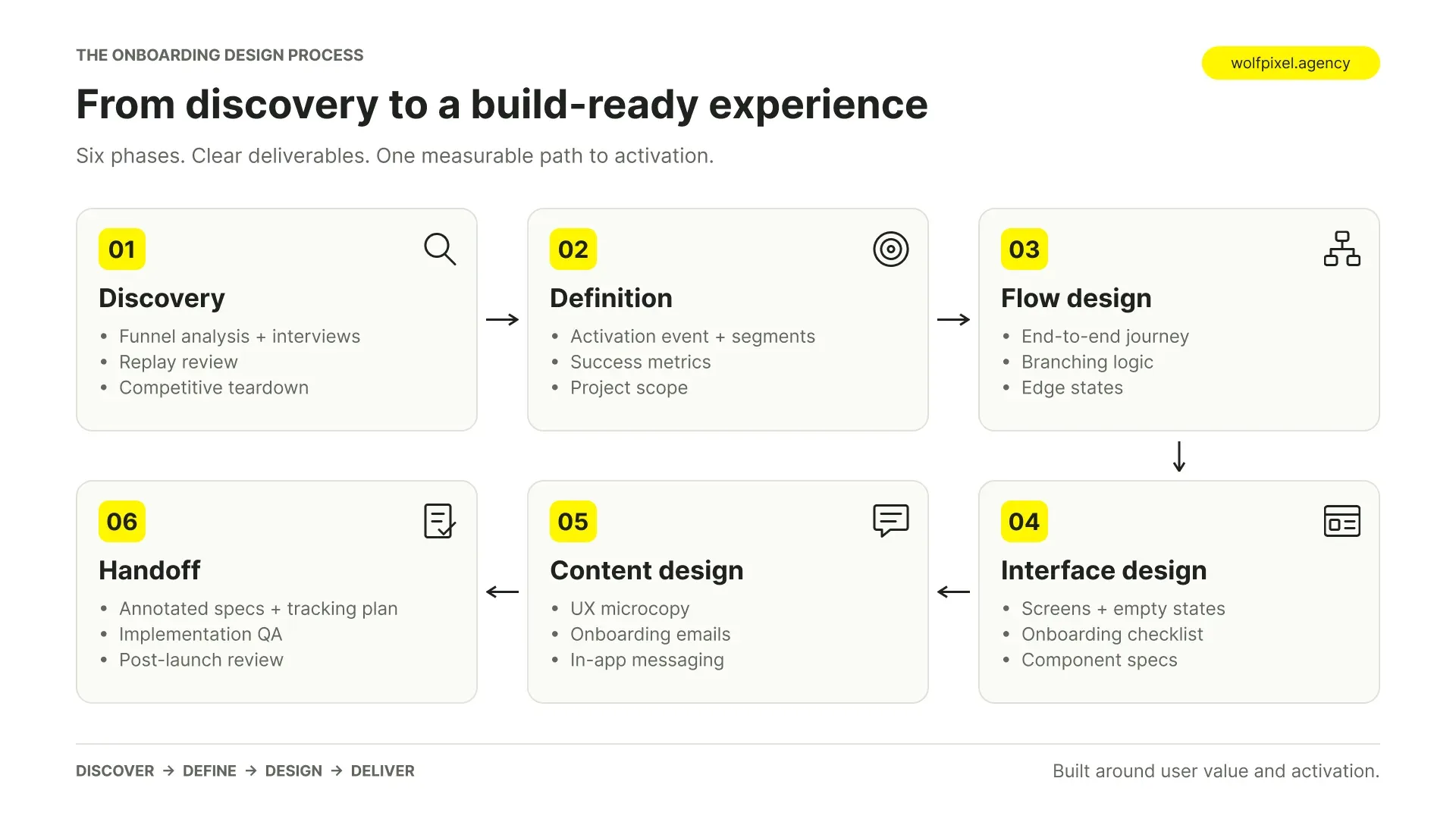
What good onboarding design work actually includes
A serious engagement covers more than screens.
| Phase | Deliverables | Why it matters |
|---|---|---|
| Discovery | Funnel analysis, interviews, replay review, competitive teardown | Prevents redesigning the wrong thing |
| Definition | Activation event, segments, success metrics, scope | Creates a shared, testable goal |
| Flow design | End-to-end journey, branching logic, edge states | Turns strategy into a build plan |
| Interface design | Screens, empty states, checklist, component specs | The visible layer |
| Content design | Microcopy, onboarding emails, in-app messaging | The most neglected high-impact part |
| Handoff | Annotated specs, tracking plan, QA, post-launch review | Ensures the design survives implementation |
If a proposal covers only interface design, expect attractive screens that do not change your numbers.
How to evaluate a design partner
- Product depth over portfolio gloss. Ask what a previous engagement changed and how it was measured. A partner who talks only about aesthetics has not worked on activation.
- Comfort with your data. They should ask for funnel numbers, retention curves, and replay access early. A partner who does not ask about metrics cannot be accountable to them.
- Willingness to argue. The right partner pushes back on your assumptions about what users need, including the founder’s.
- Implementation realism. Designs should respect your stack, design system, and engineering capacity. Elegant work that cannot be built has no value.
- Content capability. Onboarding is heavily verbal. If writing is ignored, a substantial part of the work is missing.
- Clear definition of done. Ambiguity about deliverables is the most common source of disappointment on both sides.
Investment considerations
Costs vary widely by market and scope, so treat the shape of the investment rather than the number as the useful frame.
- Scope drives cost more than seniority does. A focused engagement on the first session is a different investment than a full onboarding system spanning segments, lifecycle email, and a component library.
- Model the return in your own terms. Estimate the value of a percentage-point change in activation using your signup volume, trial-to-paid rate, and average contract value. That gives you a defensible budget ceiling and a way to judge results afterwards.
- Budget for implementation. Design is usually the smaller line item. Engineering time, instrumentation, and a post-launch iteration cycle should be planned from the start.
- Retainers suit continuous work; projects suit resets.
Risks to manage
- Redesign without diagnosis. Skip discovery and you are paying for a new coat of paint on the same broken path.
- Design that does not ship. Concepts exceeding engineering capacity end up half-implemented, which often performs worse than the original.
- Brand drift. External work can look excellent in isolation and foreign inside your product. Insist on working within your design system, or updating it deliberately.
- Knowledge leaving with the partner. Require documented rationale, component specs, and a tracking plan so your team can iterate independently.
Common onboarding mistakes to avoid
- Front-loading setup before value. The most frequent and most costly sequencing error.
- Explaining features instead of delivering outcomes. Tours that narrate the interface teach nothing durable.
- Asking segmentation questions that change nothing. Friction wearing the costume of personalization.
- Treating empty states as an afterthought. The most decisive screens, designed with the least care.
- Onboarding that never ends. Permanent guidance trains users to ignore your messaging.
- Copying a competitor’s flow. Their sequence was built for their activation event and pricing model.
- Measuring completion rather than outcome. High checklist completion with flat retention means the checklist is measuring itself.
- Ignoring the returning user and the phone. Many first sessions happen on mobile, from an email link, and many second sessions needlessly restart the introduction.
- Shipping without instrumentation. A redesign you cannot measure is one you cannot defend or improve.
Frequently Asked Questions
How long should SaaS onboarding take?
The first session should reach a meaningful outcome within a few minutes for simple products and within roughly fifteen minutes for complex B2B tools. Full setup can reasonably extend across days or weeks in enterprise contexts. What matters is that the first proof of value arrives quickly, because full setup only gets completed by users who found the early experience worthwhile.
Do we need a dedicated onboarding tool?
Not initially. Third-party platforms let non-engineers ship guidance quickly, which helps when engineering capacity is scarce. The tradeoffs are recurring cost, overlays that can behave differently from your product, and performance overhead. Many teams start with a tool to learn what works, then build the proven flows natively.
How does onboarding differ for product-led versus sales-led SaaS?
In a product-led motion the product carries the entire persuasion burden, so self-serve value delivery is essential. In a sales-led motion onboarding often begins after a contract is signed, shifting emphasis toward configuration, data migration, admin controls, and rollout across a team. Companies running both need distinct paths rather than one compromise flow.
What should be in an onboarding email sequence?
Anchor each email to a specific incomplete step rather than sending generic feature announcements. A workable structure is a message returning the user to where they stopped, a follow-up addressing the most common blocker at that stage, one showing an outcome relevant to their declared use case, and a light check-in before the trial ends. Stop the sequence the moment a user activates.
Can onboarding fix a retention problem?
Only partly. It can fix losses caused by users never reaching value, which is a large share of early churn. It cannot fix churn caused by the product not solving the problem, poor reliability, or wrong-fit customers. If activated users churn at similar rates to non-activated ones, the problem is downstream of onboarding.
Turn More Signups Into Activated Users
Your onboarding shouldn’t make users work to discover your product’s value. Wolfpixel helps SaaS teams diagnose onboarding drop-offs, reduce time to value, and design user experiences that move users from signup to activation faster.

Was this article helpful?

Written by
Maniruzzaman Jubayer
Co-founder & COO | Product Design Specialist at Wolfpixel
Maniruzzaman Jubayer is the Co-founder & COO of Wolfpixel and a product design specialist with 7 years of experience. He personally oversees website, app, dashboard and digital product design at Wolfpixel. In this article, he focuses on SaaS onboarding, activation steps and guiding new users toward product value.
View all articles