 19 min read
 Updated
The UI UX design process is a structured workflow for turning a business problem into a usable, tested product interface. It usually runs through seven steps: discovery, user research, problem definition, information architecture and user flows, wireframing and prototyping, UI design, and usability testing with developer handoff. Most teams organize these steps with a framework such as the Double Diamond or a Design Sprint. Depending on scope, the process takes anywhere from one week for a sprint to several months for a full SaaS product.
Most articles about the UX design process are written for people learning to become designers. This one is for the people who pay for design and live with the results: founders, product leaders, heads of growth, and teams deciding how much to invest in it.
I’m Maniruzzaman Jubayer, Co-founder & COO and Product Design Specialist at Wolfpixel, with 7 years of experience. I personally oversee website, app, dashboard and digital product design. This guide focuses on the UI/UX process, from user flows and wireframes to prototypes and design handoff.
This guide walks through the full UI UX design process as it works on real product teams. It covers what happens at each step, which frameworks are worth using, which UX deliverables you should expect, how long design realistically takes, what it costs, and how to avoid the mistakes that quietly drain budgets.
What Is the UI UX Design Process?
The UI UX design process is the sequence of research, planning, design, and validation activities that a team uses to build a digital product people can understand, use, and come back to. It connects business goals (conversion, activation, retention, revenue) with user needs (clarity, speed, trust).
It helps to separate the two halves:
- UX (user experience) design covers how the product works: the problem it solves, the structure of information, the flows users take, and whether they can complete their tasks without friction.
- UI (user interface) design covers how the product looks and feels: layout, typography, color, components, states, and interaction details.
In practice they aren’t separate projects. UX decisions set the skeleton and UI gives it a body. A beautiful interface on top of a confusing flow still fails, and a well-structured flow with a weak interface still loses trust.
UX design process vs. product design process
You’ll see “UX design process” and “product design process” used interchangeably. The difference is mostly scope. A product design process is wider. It includes business strategy, feature prioritization, and collaboration with engineering and product management over the whole life of the product. The UX and UI steps sit inside it. For founders and product leaders, product design is usually the more useful frame, because design decisions change roadmap and engineering cost, not only screens.
Why the process matters to the business
A defined process gives you three things ad-hoc design doesn’t:
- Predictability. You know what’s being made, when, and what decisions you need to make along the way.
- Lower rework cost. Problems found in a wireframe or prototype cost far less to fix than problems found after development.
- Alignment. Stakeholders, designers, and developers work from the same evidence rather than personal preference.
From my own work, the teams that skip the process rarely save time. They usually spend it later, redesigning screens that were built on assumptions nobody tested.
Explore our UI/UX design services to see how research, flows and interface design connect in an engagement.
“
Key takeaway
Use evidence to connect business goals with user needs.
The 7 UX Design Process Steps (Explained Step by Step)
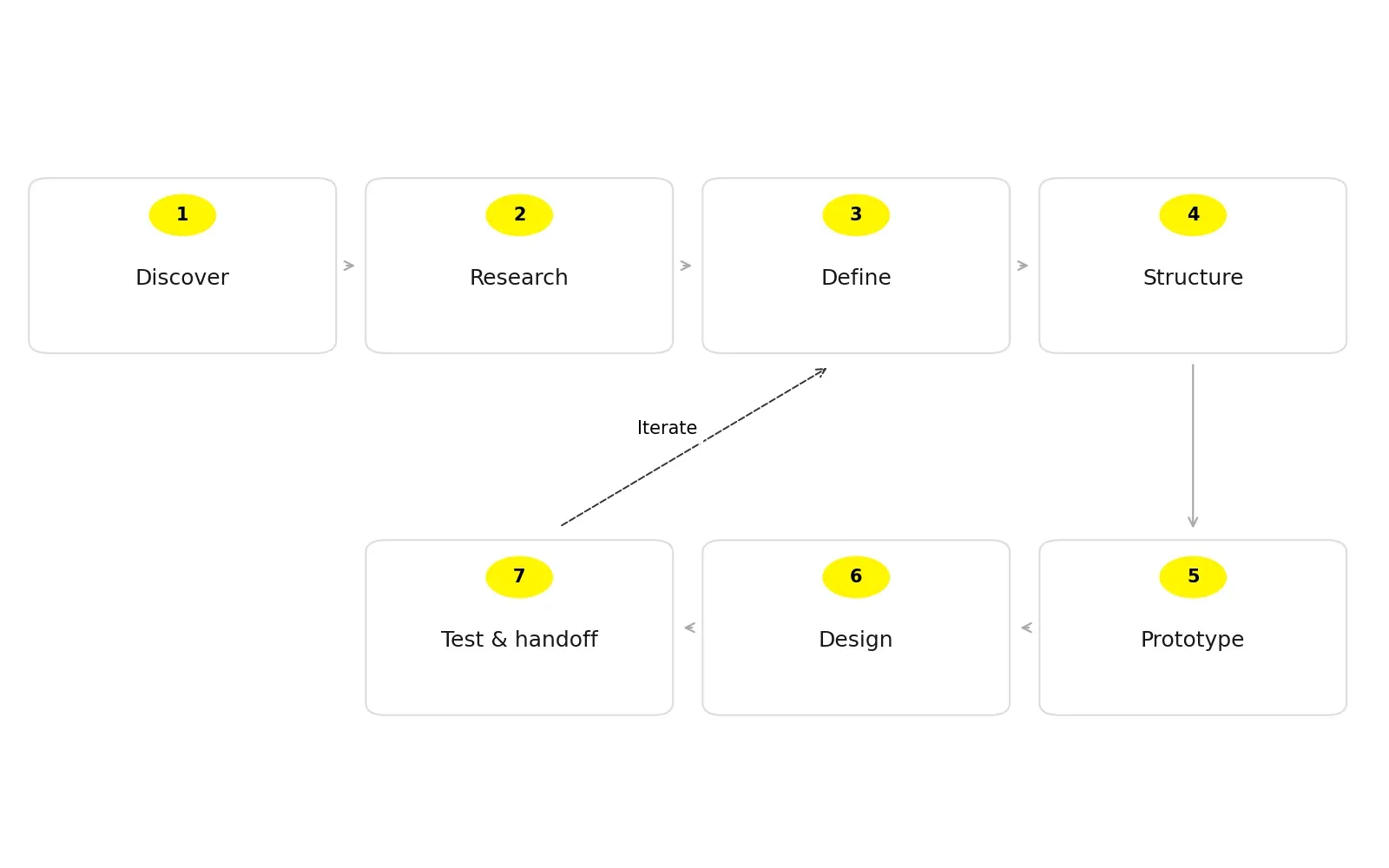
Every agency and in-house team labels these steps a little differently, but the underlying ux design workflow is consistent. Here’s the version my team uses on SaaS, fintech, and AI products, and what each step should produce.
Step 1: Discovery and alignment
Goal: Agree on the problem, the users, the business goal, and what success looks like before any design starts.
What happens:
- Stakeholder interviews with founders, product, sales, support, and engineering
- A review of existing analytics, support tickets, sales-call notes, and the current product
- Defining success metrics (for example, trial-to-paid conversion, time to first value, or task completion)
- Agreeing on constraints: budget, tech stack, deadlines, compliance
My take: This is the step clients most often want to skip, and it’s the one I push back on most. A 60-minute kickoff that leaves everyone agreeing on one primary metric does more for a project than an extra week of polishing screens.
Step 2: User research
Goal: Replace assumptions with evidence about real users’ behavior, needs, and language.
Common methods:
- Small, targeted interview rounds with people from your user segment; choose sample size around the research question and audience diversity
- Surveys to check patterns across a larger group
- Competitive and comparative analysis of how other products handle the same jobs
- Analytics and session recordings to see where users actually drop off
- Contextual inquiry, meaning you watch users do the task in their real environment
Research doesn’t have to be a big, slow phase. For an early-stage startup, a handful of well-run interviews and an honest look at the analytics is often enough to change the direction of a design.
Step 3: Define and synthesize
Goal: Turn research into clear, prioritized problems the design must solve.
Outputs usually include:
- User personas or, more usefully, jobs-to-be-done statements
- Problem statements (“Sales managers need to see at a glance which deals are at risk, because they review the pipeline in under five minutes before each stand-up.”)
- Journey maps that show emotional highs, lows, and friction points
- A prioritized list of opportunities ranked by user impact and business value
This is where a design partner earns their fee. Anyone can gather research. The skill is deciding what not to design.
Step 4: Information architecture and user flows
Goal: Decide how content and features are organized and how users move through them.
What happens:
- Sitemaps or product navigation structures
- User flows for key tasks such as signup, onboarding, the core workflow, and upgrade
- Card sorting or tree testing, when navigation is complex
For data-heavy products, this step decides most of the outcome. In dashboard projects, the hardest decisions often concern structure and priority rather than appearance. They were about which information a user needs first, and which can wait one click deeper.
Step 5: Wireframing and prototyping
Goal: Test structure and flow cheaply before investing in visual design.
- Low-fidelity wireframes show layout and hierarchy without color or branding.
- Mid-fidelity wireframes add real content and component patterns.
- Clickable prototypes, usually in Figma, let stakeholders and users experience the flow.
A good rule is to keep fidelity as low as possible for as long as possible. Once screens look finished, feedback shifts from “does this flow make sense?” to “can we change the blue?”, and you lose the chance to fix bigger problems.
Step 6: UI design and design system
Goal: Turn validated wireframes into a polished, on-brand, buildable interface.
What happens:
- A visual direction that reflects your brand (often explored through two or three style directions)
- High-fidelity screens for every key flow, including empty, loading, error, and success states
- Responsive layouts for desktop, tablet, and mobile
- A design system or component library with typography, color tokens, spacing, buttons, forms, tables, and more
- Accessibility checks for contrast, focus states, and readable type sizes
The design system is what keeps your product consistent after the first release. Without one, every new feature slowly drifts in style and developers rebuild the same components again and again.
Step 7: Usability testing, handoff, and iteration
Goal: Confirm the design works for real users, then ship it cleanly to development.
- Usability testing: watch 5 or more representative users try to complete key tasks with the prototype. NN/G recommends small iterative qualitative rounds for a focused user group; five participants is a useful starting point, not a universal sample size or guarantee. Plan separate coverage where user groups or tasks differ.
- Developer handoff: organized Figma files, component specs, interaction notes, and a walkthrough with the engineering team
- Design QA: checking the built product against the designs before release
- Post-launch iteration: reviewing analytics and feedback, then feeding what you learn into the next cycle
The UX design process isn’t a straight line. Testing often sends you back to Step 3 or Step 5, and that is the process working as intended.
The 7 steps at a glance
| Step | Core question | Key output |
|---|---|---|
| \1. Discovery | What are we solving, and how will we measure success? | Project brief, success metrics |
| \2. User research | Who are the users and what do they actually need? | Interview notes, research findings |
| \3. Define | Which problems matter most? | Problem statements, personas/JTBD, journey map |
| \4. IA & user flows | How is it organized and how do users move through it? | Sitemap, user flows |
| \5. Wireframes & prototypes | Does the structure work? | Wireframes, clickable prototype |
| \6. UI design | Is it clear, on-brand, and buildable? | High-fidelity screens, design system |
| \7. Test & handoff | Can real users succeed, and can developers build it? | Usability report, dev-ready files, QA notes |
See NN/G’s guidance on iterative usability tests. Our SaaS product design work applies these activities to real product flows.
“
Key takeaway
Keep testing and iteration inside the process.
Double Diamond, Design Sprint, or Lean UX: Which Framework Fits?
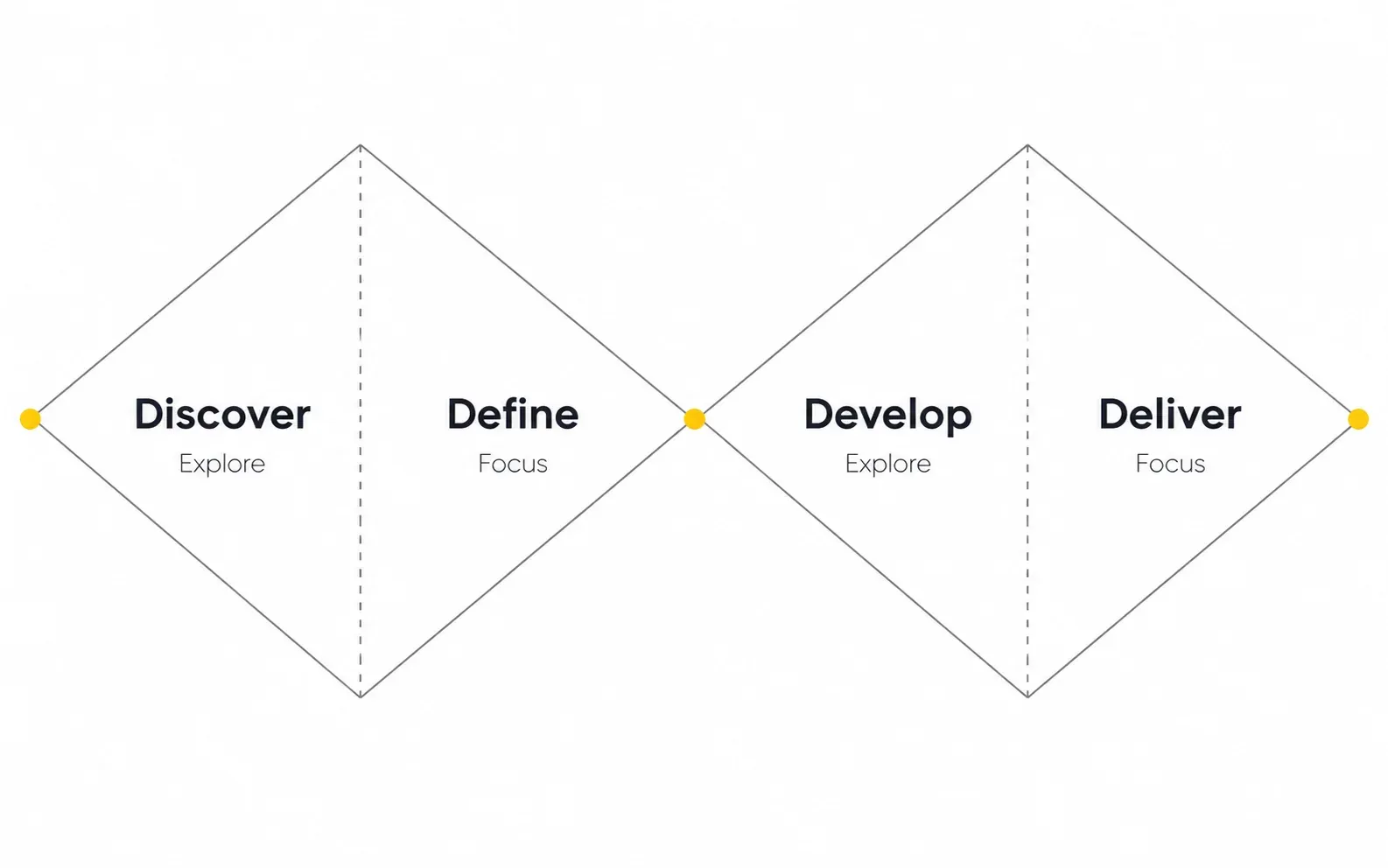
The seven steps describe what happens. A framework describes how you pace and organize it. Here are the frameworks you’re most likely to hear about, and when each one makes sense.
The Double Diamond design process
Developed by the UK Design Council, the Double Diamond splits design into two rounds of diverging (exploring widely) and converging (narrowing down):
- Discover: research the problem space broadly.
- Define: narrow down to a clear problem statement.
- Develop: explore many possible solutions.
- Deliver: test, refine, and ship the strongest solution.
Best for: new products, major redesigns, or any project where you aren’t yet sure you’re solving the right problem. Its biggest value is that it forces a team to design the right thing before designing the thing right.
The design sprint process
The Design Sprint, created by Jake Knapp at Google and developed further with his colleagues and described in the book Sprint, compresses a big decision into five days:
| Day | Activity |
|---|---|
| Monday | Map the problem and pick a target |
| Tuesday | Sketch competing solutions |
| Wednesday | Decide on the strongest ideas |
| Thursday | Prototype a realistic facade |
| Friday | Test with real users |
Best for: high-stakes questions with a clear decision-maker, such as a new onboarding concept, a pricing-page direction, or validating an MVP idea before committing engineering time. It isn’t a replacement for a full product design process. It’s a fast way to lower the risk of one decision.
Lean UX and continuous discovery
Lean UX treats design as a series of small hypotheses (“We believe that X will result in Y”), tested with the smallest possible experiment and improved in short cycles alongside development.
Best for: live products with active users, where the team ships weekly and can learn from real behavior.
Framework comparison
| Framework | Typical duration | Best for | Watch out for |
|---|---|---|---|
| Double Diamond | Weeks to months | New products, major redesigns | Can feel slow if research isn’t time-boxed |
| Design Sprint | 5 days (4-day variants exist) | One high-risk decision | Needs the decision-maker in the room all week |
| Lean UX | Ongoing, 1–2 week cycles | Live products, growth teams | Can drift into local tweaks without a bigger strategy |
| Design Thinking | Flexible | Innovation workshops, early exploration | Often stops at ideas without a delivery plan |
What I recommend in practice: most of our client work is a hybrid. We use the Double Diamond to structure a new product or redesign, run a sprint-style week when there’s one big unknown (like onboarding for an AI feature), and switch to lean, continuous cycles once the product is live.
Review the Design Council’s Double Diamond and the Design Sprint authors’ overview.
UX Deliverables: What You Should Receive at Each Stage
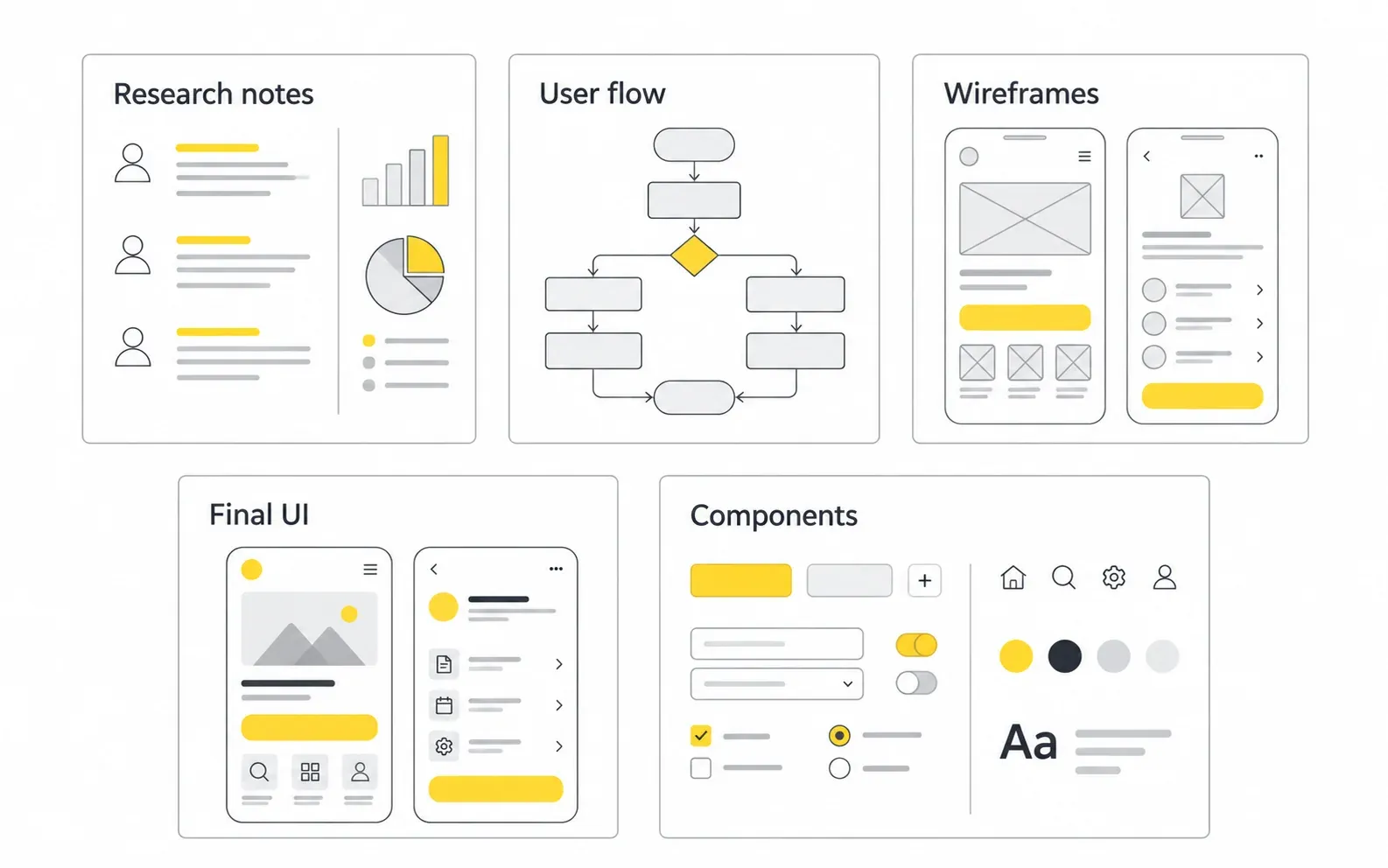
“UX deliverables” is where many buyers get confused, and where some vendors hide thin work behind nice-looking files. Here’s what a professional engagement should produce, and why each item matters to you.
| Stage | Deliverable | Why it matters to the business |
|---|---|---|
| Discovery | Project brief, success metrics, scope doc | Stops scope creep and aligns stakeholders |
| Research | Research summary, interview insights, competitor audit | Turns opinions into evidence |
| Define | Personas / JTBD, journey maps, problem statements | Focuses budget on problems that matter |
| Structure | Sitemap, user flows | Prevents navigation and logic problems before they’re built |
| Wireframing | Low/mid-fidelity wireframes, clickable prototype | Lets you test ideas cheaply |
| UI design | High-fidelity screens, all states, responsive layouts | What users actually see and developers build |
| System | Design system / component library, style guide | Keeps future features consistent and faster to design |
| Validation | Usability test report with prioritized fixes | Shows the design works, not just that it looks good |
| Handoff | Dev-ready Figma files, specs, annotations, design QA | Cuts build errors and back-and-forth |
Deliverables that matter more than they look
- Edge-case states. Empty states, errors, loading, and permission-restricted views are where products feel unfinished. If a proposal doesn’t mention them, ask.
- Annotated prototypes. Short notes on interactions and logic save developers hours of guessing.
- A design rationale. A short explanation of why key decisions were made lets your team defend and extend the design after the engagement ends.
Deliverables you can often skip
Not every project needs every artifact. A seed-stage startup rarely needs polished persona posters or a 60-page research report. Ask your design partner which deliverables will actually change decisions and which are just there for show. Good partners size their documentation to the stage of your company.
“
Key takeaway
Ask for the artifacts that change decisions and support delivery.
How Long Does UI UX Design Take?
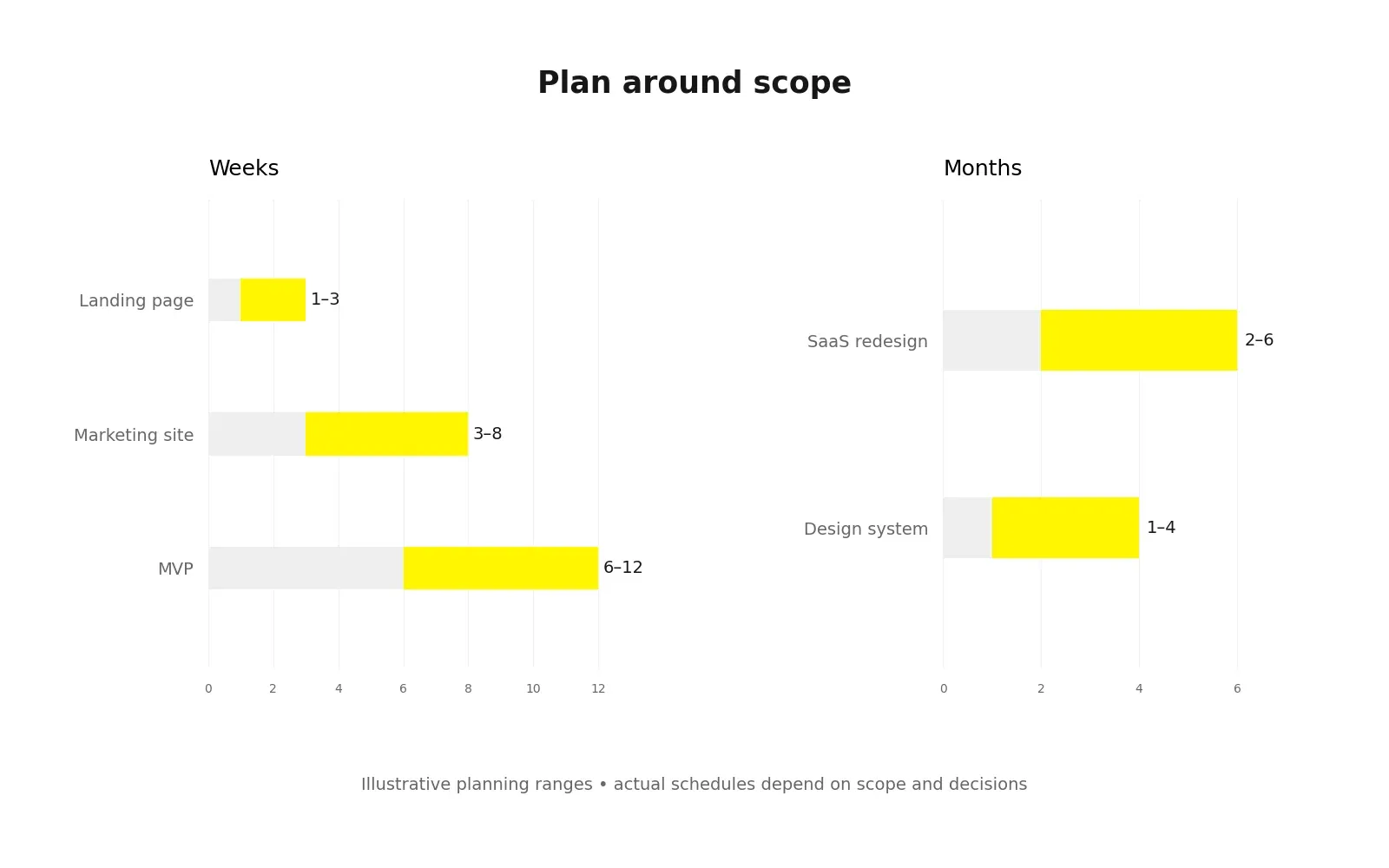
This is one of the most common questions founders ask me, and the honest answer is that it depends on scope, how complex the product is, and, more than people expect, how quickly decisions get made on the client side.
The ranges below are broad planning estimates for the scopes described, not measured industry averages or Wolfpixel package commitments. Your actual schedule depends on scope and decision speed.
| Project type | Typical design timeline | What drives the range |
|---|---|---|
| Design sprint (one key decision) | 1 week | Availability of the decision-maker |
| Landing page | 1–3 weeks | Copy readiness, number of variants |
| Marketing website (5–15 pages) | 3–8 weeks | Page count, content, brand readiness |
| MVP web or mobile app | 6–12 weeks | Number of core flows, research depth |
| Complex SaaS or fintech platform | 3–6+ months | Roles, permissions, data density, integrations |
| Design system | 1–4 months | Number of components, existing product debt |
| Redesign of an existing product | 2–6 months | Legacy constraints, migration planning |
What makes design faster
- A single, empowered decision-maker who can approve direction within 24–48 hours
- Content ready early. Designing around lorem ipsum almost always causes rework.
- An existing brand identity, so UI work doesn’t wait on branding decisions
- Clear scope with a written list of in-scope flows and screens
What makes design slower
- Feedback by committee with conflicting opinions
- Changing goals mid-project
- Skipping research, then discovering the problem during development
- No developer involvement until handoff
Wolfpixel publishes package-specific turnaround times. Agree the scope and delivery cadence at kickoff rather than applying one turnaround promise to every type of design work.
“
Key takeaway
Scope and decision speed matter as much as screen count.
What UI UX Design Costs and How to Think About the Investment
Cost ranges vary widely by region, seniority, and scope, so be wary of anyone quoting a single “average price” for UI UX design. It’s more useful to understand the pricing models and the factors that drive cost.
Common pricing models
| Model | How it works | Best for | Trade-off |
|---|---|---|---|
| Hourly | Pay for time spent | Small, unclear, or advisory work | Hard to predict total cost |
| Fixed-price project | Set scope, set fee | Well-defined projects (website, MVP) | Changes mean change requests |
| Monthly retainer / subscription | Ongoing capacity for a monthly fee | Startups and growth teams shipping continuously | Needs a steady backlog to get full value |
| In-house hire | Salary plus benefits and tools | Mature products with constant design needs | Slow to hire; one person rarely covers every skill |
For transparency: Wolfpixel’s published Bench Light package is $3,900/month at the time of this update. Package coverage and custom project quotes depend on scope; review the current design subscription plans and pricing before comparing proposals.
What drives the cost of design
- Number of unique flows and screens (not total screens, since repeated templates are cheaper)
- Depth of research and testing
- Product complexity: roles and permissions, data visualization, regulated industries such as fintech and healthcare
- Design system scope
- Platforms: web, iOS, Android, or all three
- Extra services such as branding, motion, copywriting, or development
How to think about ROI
Design pays off when it’s tied to a metric that matters to the business. Before you approve a budget, write down the one or two numbers the design should move: signup conversion, onboarding completion, demo bookings, support tickets per user, or churn. Then check whether the proposal includes the research and testing needed to actually move them. A cheaper proposal that skips validation isn’t cheaper if the result has to be redesigned in six months.
If you’re weighing whether conversion is the real problem, our guide on why SaaS products don’t convert is a useful companion to this section.
Our guide to how UX design drives higher conversions connects design decisions with measurable outcomes.
How to Evaluate a Professional Design Partner
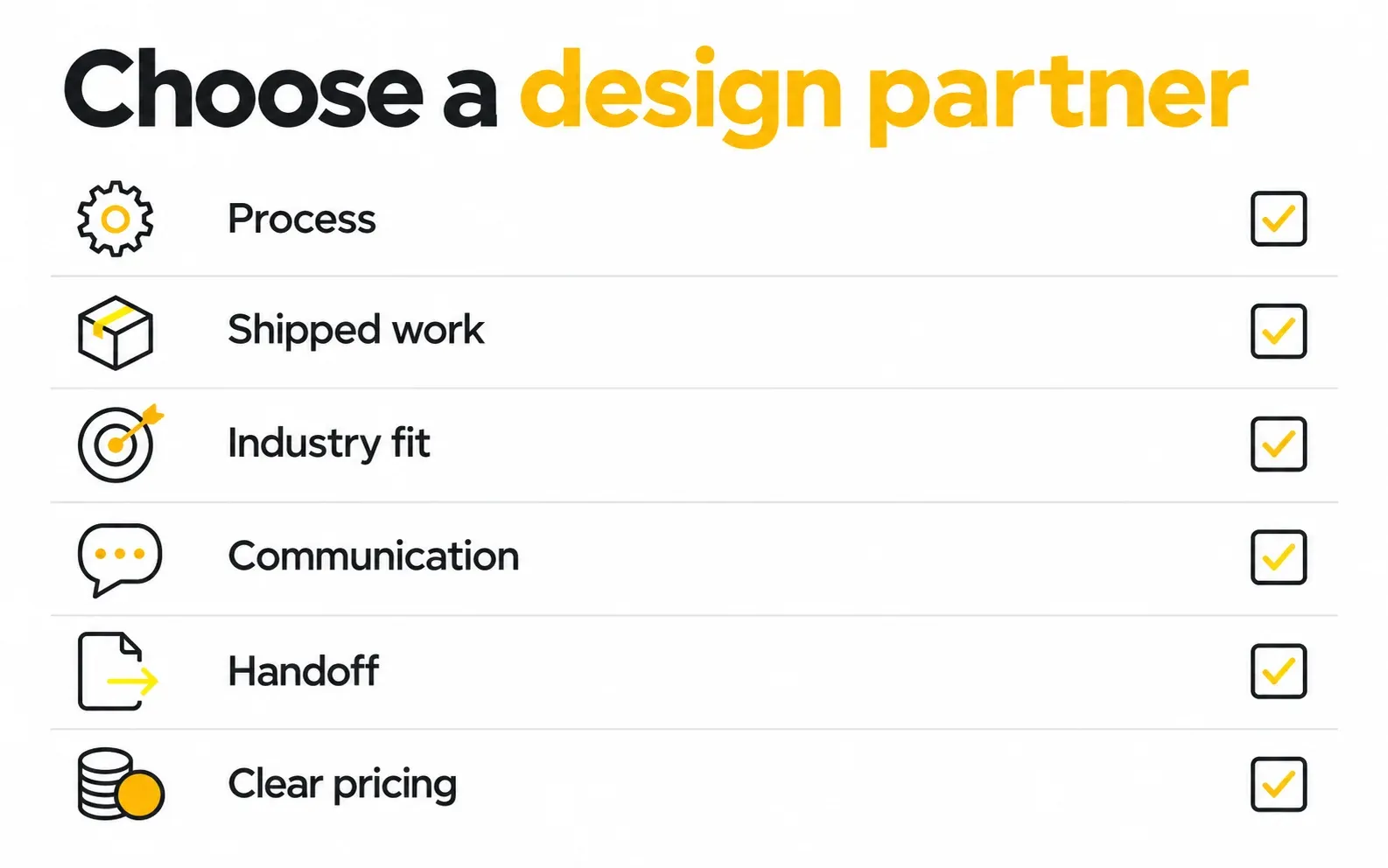
Knowing the process is half the job. The other half is choosing who runs it. Whether you’re hiring a freelancer, an agency, or building an in-house team, these are the criteria I’d use if I were on the client side.
Benefits of professional design support
- Access to senior judgment without the time and cost of hiring a full in-house team
- Cross-industry pattern knowledge, from onboarding and pricing pages to dashboards, that a first-time team would have to learn by trial and error
- Speed: an established team with a working process can start in days, not months
- Complete skill coverage: research, UX, UI, design systems, and often branding and development in one place
Evaluation criteria
- A visible, explainable process. Ask them to walk you through their UX design process steps. Vague answers (“we just get creative”) are a red flag.
- Relevant portfolio depth. Look for complex product work, not only pretty landing pages. If you’re building a data-heavy SaaS tool, you want to see dashboards, tables, and multi-step flows. Review our product design work and ask to discuss the research, flows and delivery constraints behind relevant examples.
- Case studies that show thinking, not just final screens: the problem, the constraints, what was tested, and what changed.
- Industry and stage fit. A partner used to enterprise timelines may overwhelm a seed-stage startup, and the reverse is also true.
- Communication rhythm. How often will you see work? Which tools (Slack, Figma, weekly calls)? Who is your single point of contact?
- Handoff and development support. Do they prepare dev-ready files, do design QA, or even build in Webflow, Framer, or code?
- Pricing clarity. You should understand exactly what’s included, how revisions work, and how scope changes are handled.
Questions to ask on the first call
- “How would you structure the process for our specific project?”
- “Which deliverables would you skip for a company at our stage, and why?”
- “How do you run usability testing, and with whom?”
- “What do you need from us each week to stay on schedule?”
- “What happens after launch?”
Risks to watch for
- Portfolio-only evaluation. Great visuals can hide weak UX thinking.
- Junior designers on senior-priced work. Ask who will actually design your screens.
- No testing in the plan. If validation isn’t in the proposal, it won’t happen.
- Lock-in. Make sure you own the Figma files and the design system.
If you’re comparing options, our roundup of top UI/UX agencies for SaaS growth is written to be honest about where different studios fit best.
“
Key takeaway
Evaluate the process behind the portfolio.
Common UX Design Workflow Mistakes (and How to Avoid Them)
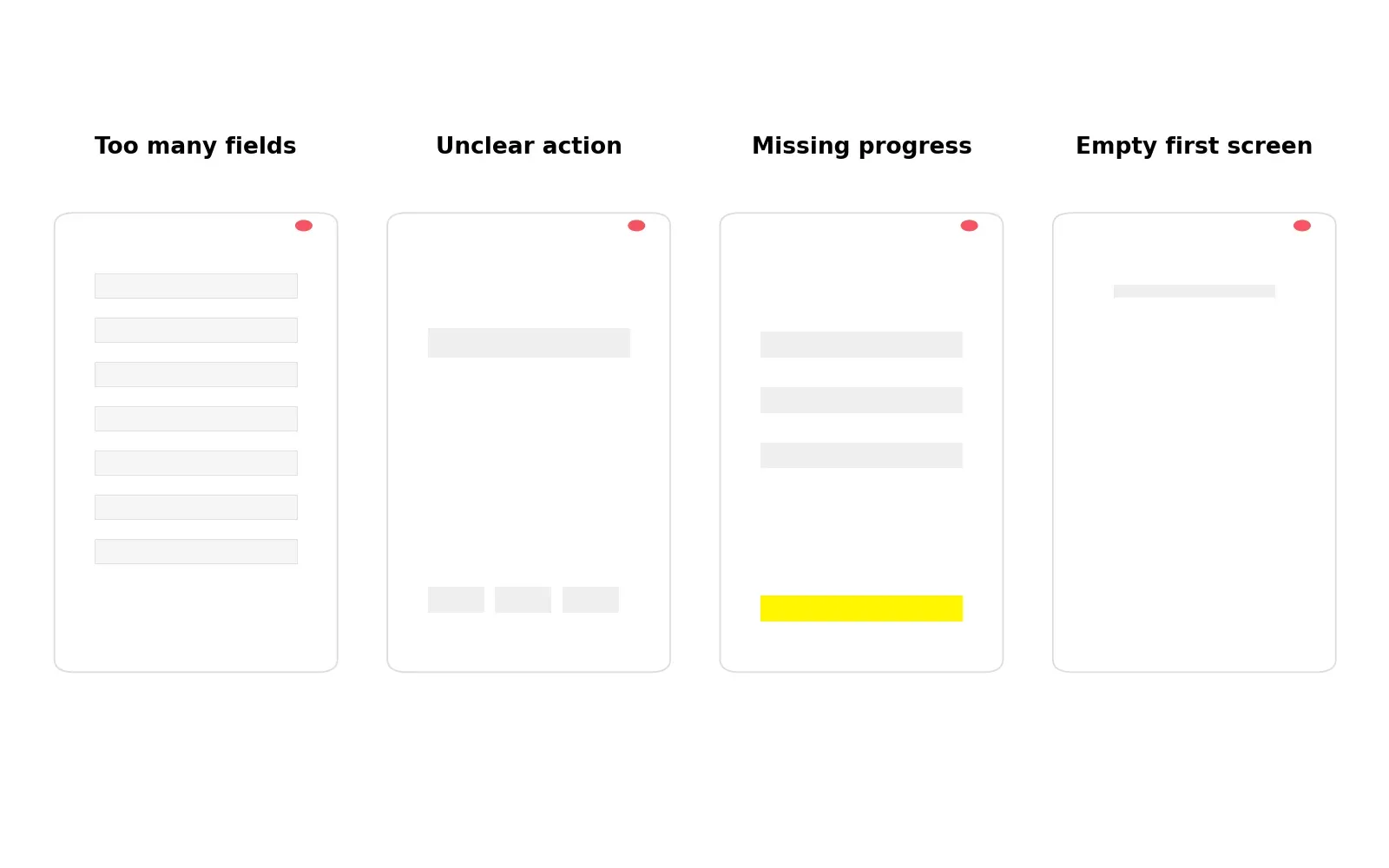
These are the patterns I see most often when a project comes to us after a previous design effort stalled. None of them come from a lack of talent. They come from gaps in the process.
1. Jumping straight to high-fidelity UI
What happens: Stakeholders fall in love with polished screens before the flow has been validated. Fix: Get sign-off on user flows and wireframes before visual design starts.
2. Designing for the founder instead of the user
What happens: The product reflects internal assumptions and vocabulary. Fix: Even five user interviews will surface the language and priorities your real customers use.
3. Treating research as optional
What happens: Problems appear during development or after launch, when they cost the most to fix. Fix: Time-box research instead of cutting it. A focused week is better than none.
4. Feedback by committee
What happens: Conflicting opinions stall progress and dilute the design. Fix: Name one decision-maker and judge feedback against the agreed success metrics, not personal taste.
5. Ignoring edge cases and states
What happens: Empty, error, and loading states get improvised by developers, and the product feels unfinished. Fix: Make “all states designed” part of your definition of done.
6. Involving developers too late
What happens: Designs turn out to be expensive or impossible to build as drawn. Fix: Bring an engineer into wireframe reviews to check feasibility early.
7. No design system
What happens: Every new feature looks slightly different, and design and development slow down over time. Fix: Build a lightweight component library from the first release, and grow it as the product grows.
8. Treating launch as the finish line
What happens: The team moves on and never learns whether the design worked. Fix: Plan a post-launch review against your success metrics, and budget for at least one round of iteration.
9. Separating brand from product
What happens: The marketing site promises one experience and the product delivers another. Fix: Keep brand identity and product UI in one visual system so users feel continuity from first click to daily use.
Planning a product, redesign or MVP? Book a free 30-minute call to discuss your goals, scope and next step.
“
Key takeaway
If you are using these checkpoints to hire a partner, our Chicago UI design agency comparison shows how to ask about research, prototypes, delivery responsibilities and local or remote collaboration.
Plan for edge cases, engineering reviews and post-launch learning.
What is the difference between a UX designer and a UI designer?
A UX designer focuses on research, structure, and flows: whether the product solves the right problem in a logical way. A UI designer focuses on the visual layer: layout, typography, color, components, and interaction details. On smaller teams and at many agencies, one product designer covers both, which is why the combined term “UI UX designer” is common.
Can a startup skip user research to save money?
You can reduce it, but skipping it entirely usually moves the cost somewhere else, typically into development rework or a redesign after launch. A lean alternative is a few targeted user interviews, a review of your existing analytics, and a quick usability test on a prototype before development starts.
What tools are used in the UI UX design process?
Figma is the standard tool for wireframing, UI design, prototyping, and design systems. Teams often add FigJam or Miro for workshops and journey mapping, Maze or Lyssna for remote usability testing, and analytics tools such as Hotjar or Mixpanel to study real user behavior after launch.
Should I hire a freelancer, an agency, or an in-house designer?
A freelancer suits small, well-defined tasks. An agency or design subscription suits startups and growth-stage teams that need senior, multi-skill design without long hiring cycles. An in-house team makes sense when design needs are constant and large enough to justify full-time salaries, and many companies combine an in-house lead with an external partner.
How involved do I need to be as a founder during the design process?
Most involved at the start and at key decision points: discovery, direction sign-off, and usability test reviews. A realistic commitment is a kickoff session, a short weekly review, and quick async feedback on work in progress. Slow or unclear decisions are one of the most common reasons design timelines slip.
Can design and development happen at the same time?
Yes. On many product teams, design works one or two sprints ahead of development. Designers validate and finalize the next set of flows while engineers build the current one. This works best once the core structure and design system are in place.
Planning a product, redesign, or MVP?
Book a free 30-minute call to discuss your product goals, design process, scope and practical next step.

Was this article helpful?

Written by
Maniruzzaman Jubayer
Co-founder & COO | Product Design Specialist at Wolfpixel
Maniruzzaman Jubayer is the Co-founder & COO of Wolfpixel and a product design specialist with 7 years of experience. He personally oversees website, app, dashboard and digital product design at Wolfpixel. In this article, he focuses on the UI/UX process, from user flows and wireframes to prototypes and design handoff.
View all articles