

 17 min read
 Updated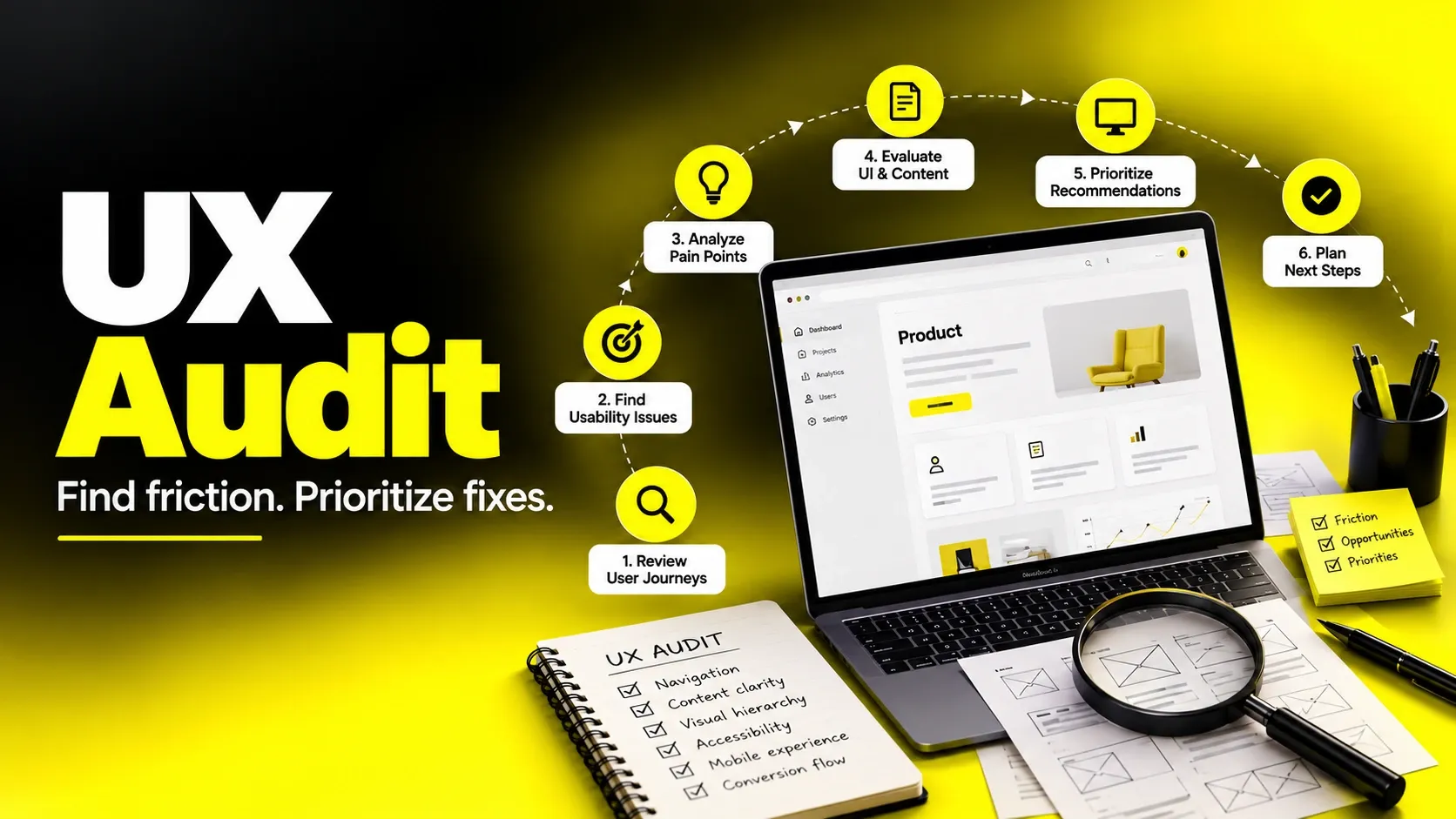
A UX audit is a structured review of a digital product that finds usability problems, explains why they hurt users and the business, and ranks fixes by impact. It combines expert review methods such as heuristic evaluation with real evidence from analytics, session recordings, and user feedback. A good UX audit ends with a prioritized report your team can act on, not just a list of opinions. As an indicative planning range, a focused audit may take one to three weeks; scope, recruitment and access to data can change the schedule.
I’m Maniruzzaman Jubayer, Co-founder & COO and Product Design Specialist at Wolfpixel, with 7 years of experience. I personally oversee website, app, dashboard and digital product design. This guide focuses on UX evaluation, identifying friction and prioritizing practical interface improvements.
Most teams don’t ask for a UX audit when things are going well. They ask when signups plateau, when support tickets keep repeating the same confusion, or when a redesign is on the table and nobody can agree on what’s actually broken.
A structured audit replaces guesswork with evidence. When teams know something is wrong but cannot locate it, reviewing real journeys and existing data helps turn uncertainty into a prioritized plan.
This guide is written for founders, product leaders, heads of growth, and teams investing in design. You’ll learn exactly what a UX audit covers, how to conduct a UX audit step by step, what belongs in a UX audit checklist, how heuristic evaluation fits in, what a useful UX audit report looks like, and how to decide between doing it in-house or bringing in professional help.
What Is a UX Audit (and What It Isn’t)?
A UX audit is a systematic evaluation of a website, app, or digital product to identify where the experience makes it harder for users to reach their goals — and, as a result, harder for the business to reach its own. You’ll also hear it called a usability audit, UX review, or experience audit. The labels overlap; what matters is the method.
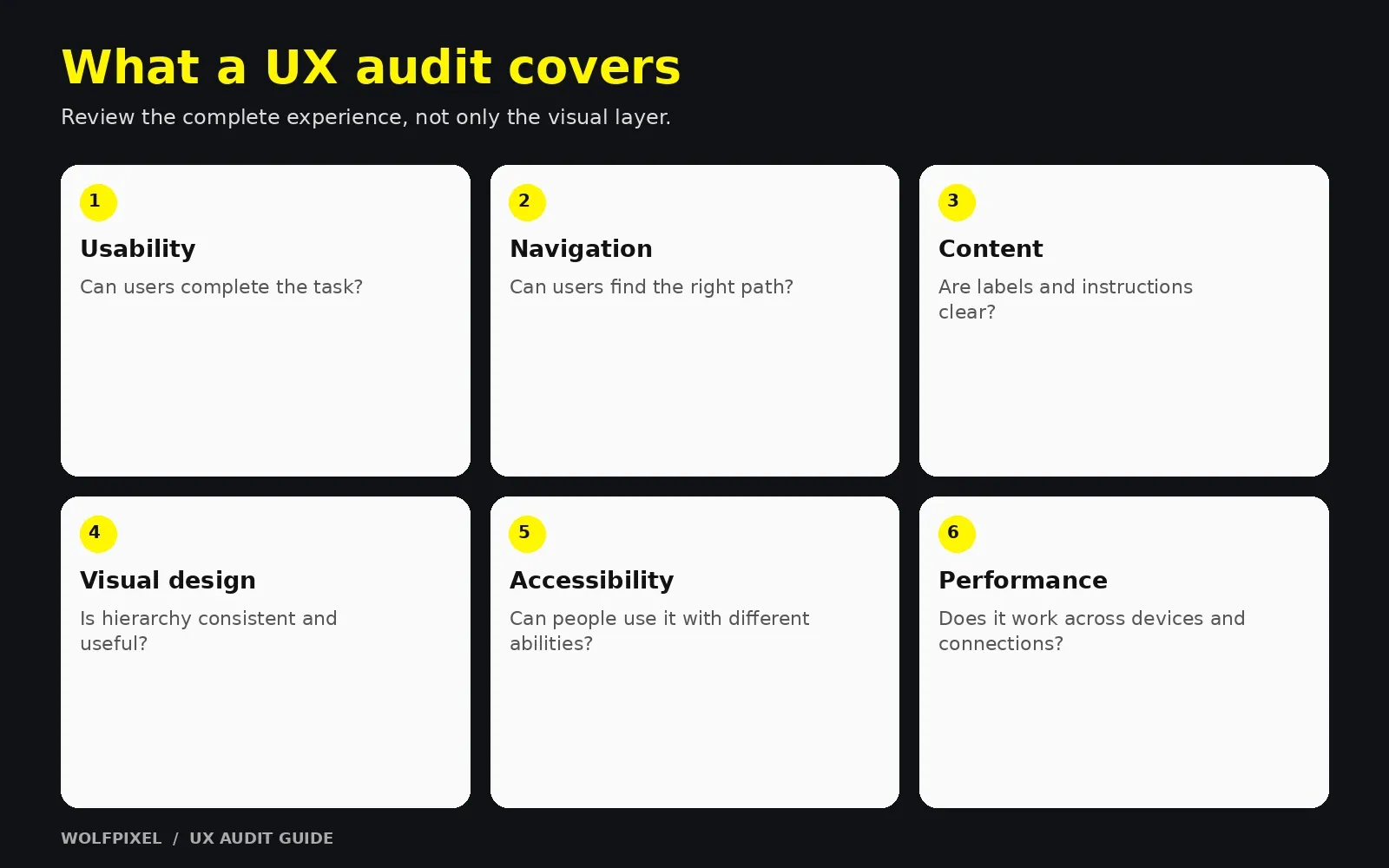
A strong UX audit answers three questions:
- What is going wrong? (the issue)
- Why does it matter? (the user and business impact, backed by evidence)
- What should we do first? (prioritized, practical recommendations)
What a UX audit typically covers
- Usability: Can people complete key tasks without confusion or errors?
- Information architecture: Can users find what they need? Do navigation labels make sense?
- User flows: Are onboarding, checkout, signup, or booking flows free of unnecessary friction?
- Content and microcopy: Is the language clear, specific, and helpful at decision points?
- Visual design and consistency: Does the interface create clear hierarchy and behave predictably?
- Accessibility: Can people with disabilities use the product? (Often checked against WCAG.)
- Performance and responsiveness: Does the experience hold up on mobile and slower connections?
- Conversion paths: Where do users drop off, and what in the design may be causing it?
What a UX audit is not
What a UX audit is and is not
| A UX audit is… | A UX audit is not… |
|---|---|
| Evidence-based analysis of user problems | A list of personal design preferences |
| Focused on goals, tasks, and outcomes | A visual “refresh” or restyle |
| Prioritized by impact and effort | An unranked dump of every small issue |
| A diagnostic that informs decisions | A replacement for ongoing user research |
| Usually a defined, time-boxed project | A full redesign |
“
KEY TAKEAWAY
Connect each finding to a usability principle, observed behavior or a data point.
UX audit vs. usability testing vs. CRO audit
- UX audit: Broad diagnostic combining expert review with existing data.
- Usability testing: Watching real users attempt tasks. Often part of — or a follow-up to — an audit.
- CRO audit: Narrower focus on conversion rate, often tied to A/B testing. A website UX audit frequently feeds into CRO work, but also looks at problems that don’t show up directly in conversion numbers, like trust, clarity, and accessibility.
Why a UX Audit Matters: Business Benefits for Product Teams
For founders and growth leaders, the value of a UX audit isn’t “better design” in the abstract. It’s clarity about where to spend limited time and budget.
Key benefits
- Finds hidden revenue and retention leaks. Friction in signup, onboarding, pricing pages, or checkout often goes unnoticed because the team knows the product too well to feel it.
- Replaces internal debate with evidence. Instead of five stakeholders arguing about the homepage, you have findings tied to data and user behavior.
- De-risks redesigns. An audit tells you what to keep, what to fix, and what to rebuild — so you don’t throw away parts that already work.
- Prioritizes the roadmap. Impact-vs-effort ranking helps product and engineering pick quick wins before large initiatives.
- Reduces support load. Recurring support questions are frequently symptoms of unclear UI or copy.
- Improves accessibility. Surfacing barriers early helps teams build a more inclusive experience and prioritize remediation.
- Creates a baseline. A documented audit gives you a reference point to measure future improvements against.
“
KEY TAKEAWAY
Small changes to labels, forms and pricing clarity can be worth testing before a redesign.
Who benefits most
What each role gets from an audit
| Role | What they get from a UX audit |
|---|---|
| Founders | A clear view of what’s blocking growth and where to invest |
| Product leaders | A prioritized, evidence-backed backlog |
| Heads of growth | Friction points in funnels and ideas for experiments |
| Design teams | An outside-in perspective and shared language for issues |
| Engineering | Well-scoped, justified tickets instead of vague requests |
When Should You Run a UX Audit?
You don’t need a UX audit every month, but there are moments when one pays off clearly.
Signs it’s time for a UX audit
- Conversion, activation, or retention has stalled or dropped without an obvious cause.
- Analytics show significant drop-off at a specific step, but nobody knows why.
- Support tickets and sales calls repeat the same confusion.
- You’re planning a redesign, re-platform, or major feature launch.
- The product has grown through many quick releases and now feels inconsistent.
- You’ve acquired or inherited a product and need to understand its state quickly.
- You’re preparing for fundraising or a major marketing push and want the experience to hold up under new traffic.
- You have accessibility concerns or compliance requirements to meet.
Good timing by product stage
Recommended audit focus by product stage
| Stage | Recommended focus |
|---|---|
| Pre-launch / MVP | Core task flows, onboarding clarity, obvious usability blockers |
| Early traction | Activation funnel, pricing and signup pages, mobile experience |
| Scaling | Consistency, information architecture, design system gaps, accessibility |
| Pre-redesign | Full website UX audit to decide what to keep, fix, or rebuild |
| Mature product | Periodic targeted audits of high-value flows |
“
KEY TAKEAWAY
Audit before a redesign to identify underlying issues before changing the visual layer.
How to Conduct a UX Audit: A Step-by-Step Process
Here’s the process I follow and recommend. It works for a SaaS product, an ecommerce store, a marketing website, or a mobile app — you simply adjust the scope.
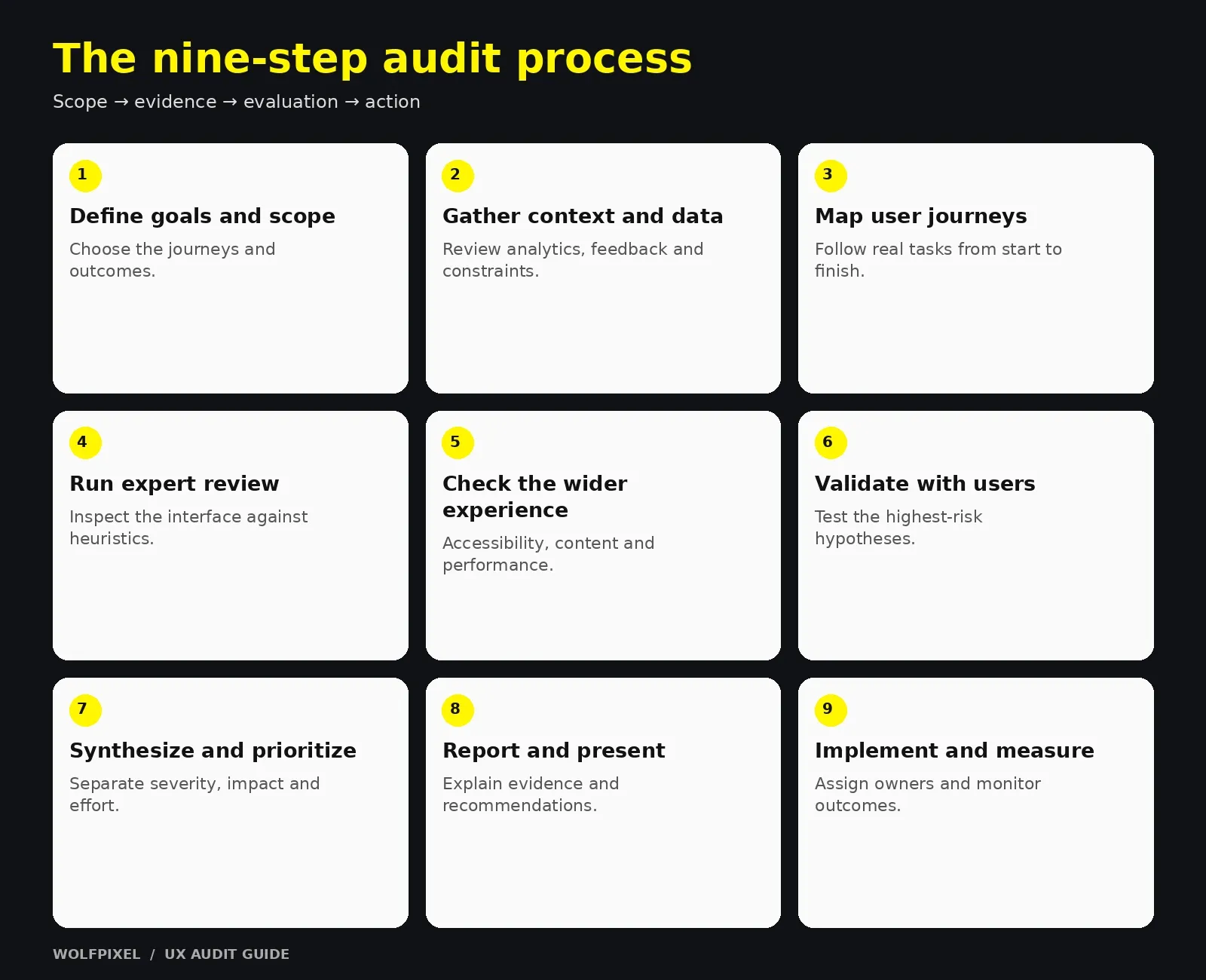
Step 1: Define goals and scope
Start with the business, not the interface.
- What business outcome are you trying to improve? (e.g., trial signups, demo requests, checkout completion, activation)
- Which user segments matter most?
- Which flows, pages, or platforms are in scope — desktop, mobile web, native app?
- What’s out of scope?
Output: A one-page audit brief with goals, scope, key user tasks, and success metrics.
Step 2: Gather context and existing data
Before reviewing a single screen, collect what the team already knows.
- Analytics: funnels, drop-off points, device split, top landing and exit pages
- Behavioral tools: session recordings and heatmaps, if available
- Voice of the customer: support tickets, sales call notes, reviews, survey responses, NPS comments
- Previous research: personas, past usability tests, earlier audits
- Stakeholder interviews: short conversations with product, sales, support, and engineering
Output: A list of known problems, suspected problems, and open questions.
Step 3: Map key user journeys
Identify the three to five tasks that matter most — for example, “sign up and create the first project” or “find a product and check out.” Walk through each one as a user would, step by step, on each in-scope device.
Output: Journey maps or flow diagrams showing every step, decision point, and potential friction.
Step 4: Run the expert review (heuristic evaluation)
Evaluate each screen and flow against established usability principles — most commonly Jakob Nielsen’s 10 usability heuristics (covered in detail below). Document every issue with a screenshot, the principle it violates, and where it occurs.
Tip: Have at least two evaluators review independently, then combine findings. Different reviewers catch different issues.
Step 5: Check accessibility, content, and performance
- Run automated accessibility checks, then verify manually (keyboard navigation, focus states, screen reader basics, color contrast).
Automated tools cannot determine accessibility on their own. Follow W3C’s guidance on accessibility evaluation tools and include human evaluation.
- Review microcopy at key decision points: CTAs, form labels, error messages, pricing details.
- Check page speed and layout stability, especially on mobile.
Step 6: Validate findings with users (when possible)
Expert review finds likely problems; usability testing helps assess them with the people who use your product. Start with a focused qualitative round on important tasks and iterate. Recruit separately for materially different user groups, and choose sample size for the research question; a small round does not guarantee every issue will be found.
Step 7: Synthesize and prioritize
Group related issues into themes, then rate each one.
- Severity: How badly does it block or frustrate users?
- Frequency / reach: How many users encounter it?
- Business impact: Does it affect a revenue-critical or retention-critical flow?
- Effort: How hard is it to fix?
Plot issues on an impact-vs-effort matrix to separate quick wins from strategic projects.
Step 8: Write the report and present it
Turn findings into a clear UX audit report (see the template section below) and walk stakeholders through it live. A presentation with discussion leads to far more action than a document sent by email.
Step 9: Plan implementation and measure
Convert recommendations into backlog items, assign owners, and define how you’ll measure success. Revisit key metrics after fixing the ship.
“
KEY TAKEAWAY
A specific audit goal gives every finding a clear purpose.
The Complete UX Audit Checklist
Use this UX audit checklist as a starting point. Adapt it to your product type and goals — not every item applies to every product.
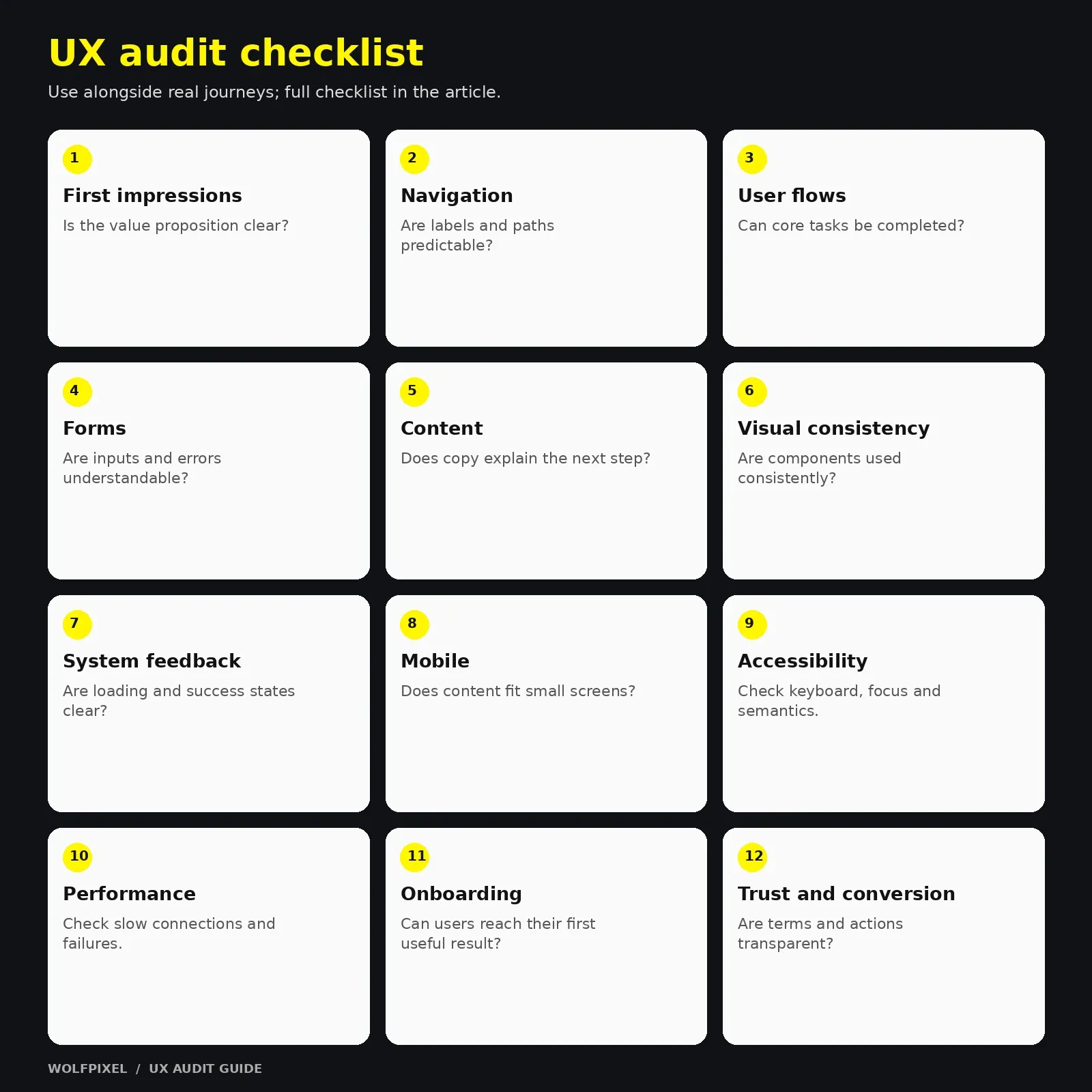
1. First impressions and value proposition
- Is it clear within seconds what the product does and who it’s for?
- Is the primary CTA visible and specific?
- Does the page build trust (social proof, security cues, clear company information)?
- Does the landing page match the promise of the ad or link that brought users there?
2. Navigation and information architecture
- Are navigation labels clear and written in users’ language, not internal jargon?
- Can users find key pages within a few clicks?
- Does search work well, including typos and no-result states?
- Is the current location always clear (active states, breadcrumbs where useful)?
3. Key user flows
- Can users complete core tasks without help?
- Are there unnecessary steps, fields, or decisions?
- Is progress visible in multi-step flows?
- Can users go back or undo without losing work?
4. Forms and inputs
- Are only necessary fields requested?
- Are labels visible (not only placeholders)?
- Is validation inline, specific, and helpful?
- Are correct input types used on mobile (email, number, phone keyboards)?
5. Content and microcopy
- Are CTAs action-oriented and specific?
- Do error messages explain what happened and how to fix it?
- Is pricing clear, including what’s included and any limits?
- Are empty states helpful rather than blank?
6. Visual design and consistency
- Is visual hierarchy clear on each screen?
- Are components, colors, and spacing consistent?
- Do interactive elements look clickable, and non-interactive ones not?
- Is typography readable in size, line length, and contrast?
7. Feedback and system status
- Do users get feedback after actions (loading, success, error)?
- Are long processes accompanied by progress indicators?
- Are confirmations shown for destructive actions?
8. Mobile and responsiveness
- Are tap targets large enough and well spaced?
- Does the layout adapt without horizontal scrolling or hidden content?
- Are key actions reachable without excessive scrolling?
9. Accessibility
- Does text meet WCAG color contrast requirements?
- Is the whole interface usable with a keyboard alone?
- Are focus states visible?
- Do images have meaningful alt text?
- Are form fields properly labeled for screen readers?
10. Performance and technical quality
- Do key pages load quickly on mobile networks?
- Is the layout stable while loading?
- Are there broken links, errors, or dead ends?
11. Onboarding and activation (for SaaS and apps)
- Do new users reach a meaningful first outcome quickly?
- Is guidance contextual rather than a long upfront tour?
- Are permission and data requests explained?
12. Trust and conversion
- Are reviews, testimonials, or case studies placed near decision points?
- Are policies (refunds, cancellation, privacy) easy to find?
- Are there surprise costs or steps late in the flow?
“
KEY TAKEAWAY
Use the checklist as a safety net; walk through real user journeys first.
For device-specific review, use our mobile app design guide alongside the audit checklist.
For a legal-services example, our law firm website design guide includes checks for dark/gold contrast, mobile typography and consultation forms. Use those as review prompts, then test the actual site rather than inferring usability from a screenshot.
Heuristic Evaluation and Other UX Audit Methods
What is heuristic evaluation?
Heuristic evaluation is an expert review in which evaluators inspect an interface against recognized usability principles. It does not require recruiting users, but its findings remain hypotheses until supported by other evidence.
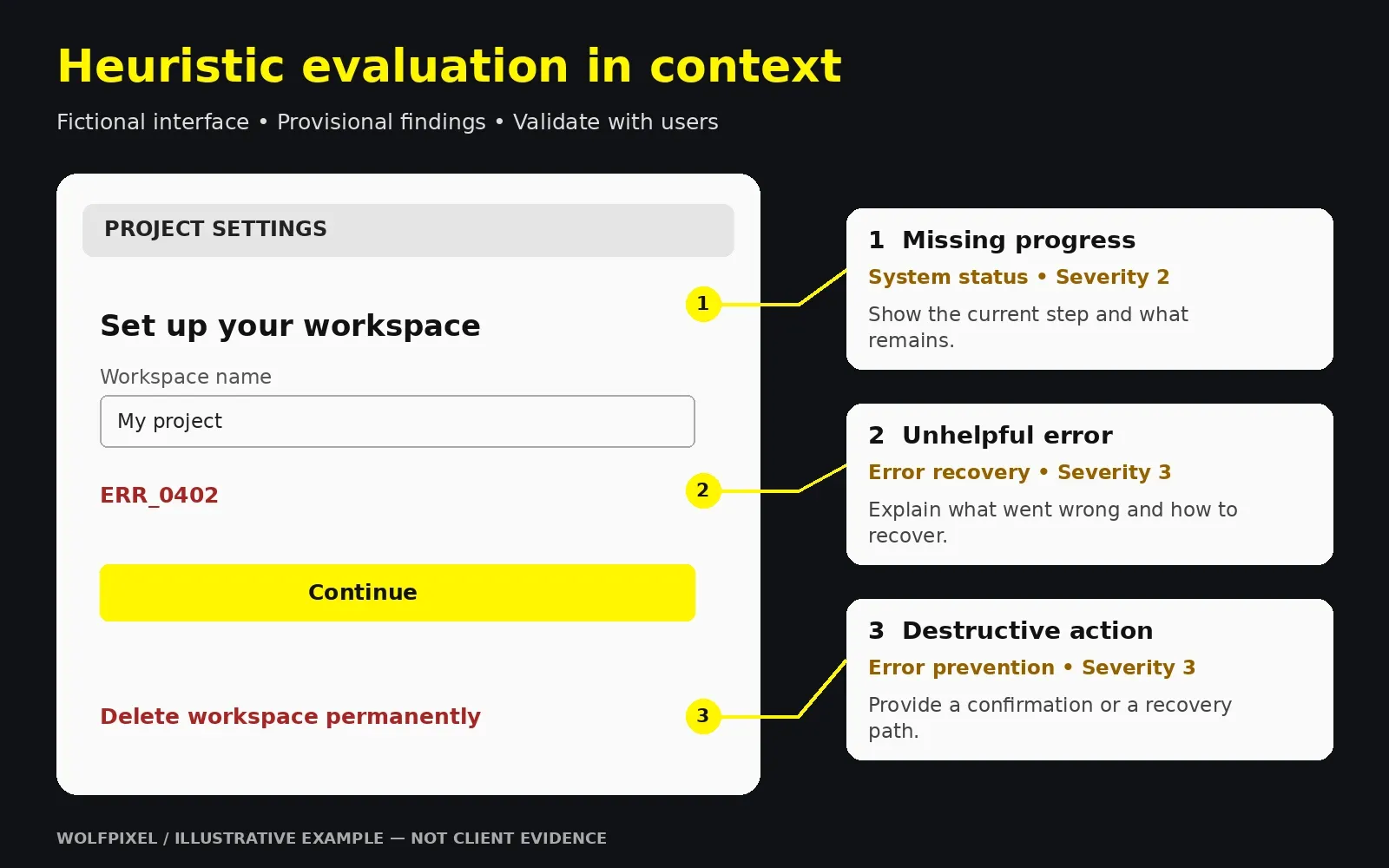
Jakob Nielsen’s ten usability heuristics provide a widely used framework for this review:
Source: Jakob Nielsen’s ten usability heuristics.
Jakob Nielsen’s ten usability heuristics
| # | Heuristic | What to look for |
|---|---|---|
| 1 | Visibility of system status | Loading states, progress, confirmation messages |
| 2 | Match between system and the real world | Familiar language and concepts, no internal jargon |
| 3 | User control and freedom | Undo, cancel, back, easy exits |
| 4 | Consistency and standards | Consistent patterns within the product and with platform conventions |
| 5 | Error prevention | Constraints, confirmations, smart defaults |
| 6 | Recognition rather than recall | Visible options, helpful suggestions, no memorization |
| 7 | Flexibility and efficiency of use | Shortcuts and accelerators for experienced users |
| 8 | Aesthetic and minimalist design | Only relevant information competing for attention |
| 9 | Help users recognize, diagnose, and recover from errors | Plain-language error messages with a solution |
| 10 | Help and documentation | Findable, task-focused help when needed |
How to run a heuristic evaluation well
- Brief evaluators on goals, users, and key tasks.
- Review independently so evaluators don’t influence each other.
- Document each issue with a screenshot, location, violated heuristic, and severity.
- Merge and de-duplicate findings as a group.
- Use a consistent severity scale, and consider frequency, user impact and persistence when assigning a rating:
- 0 — Not a problem
- 1 — Cosmetic: fix if time allows
- 2 — Minor: low priority
- 3 — Major: important to fix
- 4 — Usability catastrophe: fix before release
See Nielsen Norman Group’s severity-rating guidance.
Other UX audit methods to combine with heuristics
Methods to combine in a UX audit
| Method | Best for | Limitation |
|---|---|---|
| Analytics review | Finding where users drop off | Doesn’t explain why |
| Session recordings and heatmaps | Seeing actual behavior on pages | Time-consuming to review; privacy settings needed |
| Usability testing | Confirming real user struggles | Requires recruiting and planning |
| Cognitive walkthrough | Evaluating learnability for new users | Narrow focus on specific tasks |
| Accessibility testing | WCAG conformance and inclusive design | Automated tools miss many issues |
| Competitive review | Understanding user expectations in your category | Competitors aren’t always right |
| Surveys and feedback analysis | Capturing stated frustrations at scale | What people say can differ from what they do |
Research-backed guidelines vs. general heuristics
Nielsen’s heuristics are broad by design. For specialized products — especially ecommerce — many teams also use more detailed, research-based guideline sets for areas like product pages, checkout, and search. Broad heuristics tell you what kind of problem exists; specialized guidelines help you pinpoint specific patterns. Using both gives the most complete picture.
“
KEY TAKEAWAY
Treat expert findings as hypotheses and validate their impact with user evidence.
UX Audit Template and Report Example
A UX audit is only as useful as its report. If stakeholders can’t understand it in a few minutes, and engineers can’t act on it, the work gets shelved.
UX audit template: recommended report structure
- Executive summary — Top findings, biggest opportunities, and recommended next steps on a single page.
- Goals, scope, and methodology — What was reviewed, how, with which data, and any limitations.
- Key metrics snapshot — Relevant funnel and behavior data used as evidence.
- Findings by theme or journey — Grouped issues with evidence and severity.
- Prioritized recommendations — Impact vs. effort, quick wins vs. strategic changes.
- Accessibility summary — Key gaps and suggested remediation.
- Implementation roadmap — Suggested order, owners, and dependencies.
- Measurement plan — Which metrics to watch after fixes ship.
- Appendix — Full issue log, screenshots, raw data references.
UX audit report example (illustrative)
The following is a hypothetical example to show how a well-written finding should read:
Hypothetical finding 04: Pricing plans are hard to compare
- Location: Pricing page, desktop and mobile
- Issue: Plan cards use different feature order; users must move between cards to compare.
- Illustrative evidence: In this fictional scenario, recordings show repeated scrolling and support questions ask which plan includes a feature. This is not evidence from a real client.
- Principle: Recognition rather than recall; aesthetic and minimalist design
- Severity: 3 — Major (illustrative rating)
- Recommendation: Use consistent feature rows and clear plan labels. Adapt the comparison for mobile without hiding essential information; test keyboard access and readability.
- Impact / effort: High impact / medium effort — hypothetical estimates to validate.
Notice the structure: the issue is specific, the evidence is stated, the principle is named, and the recommendation is actionable. That’s what makes a report credible.
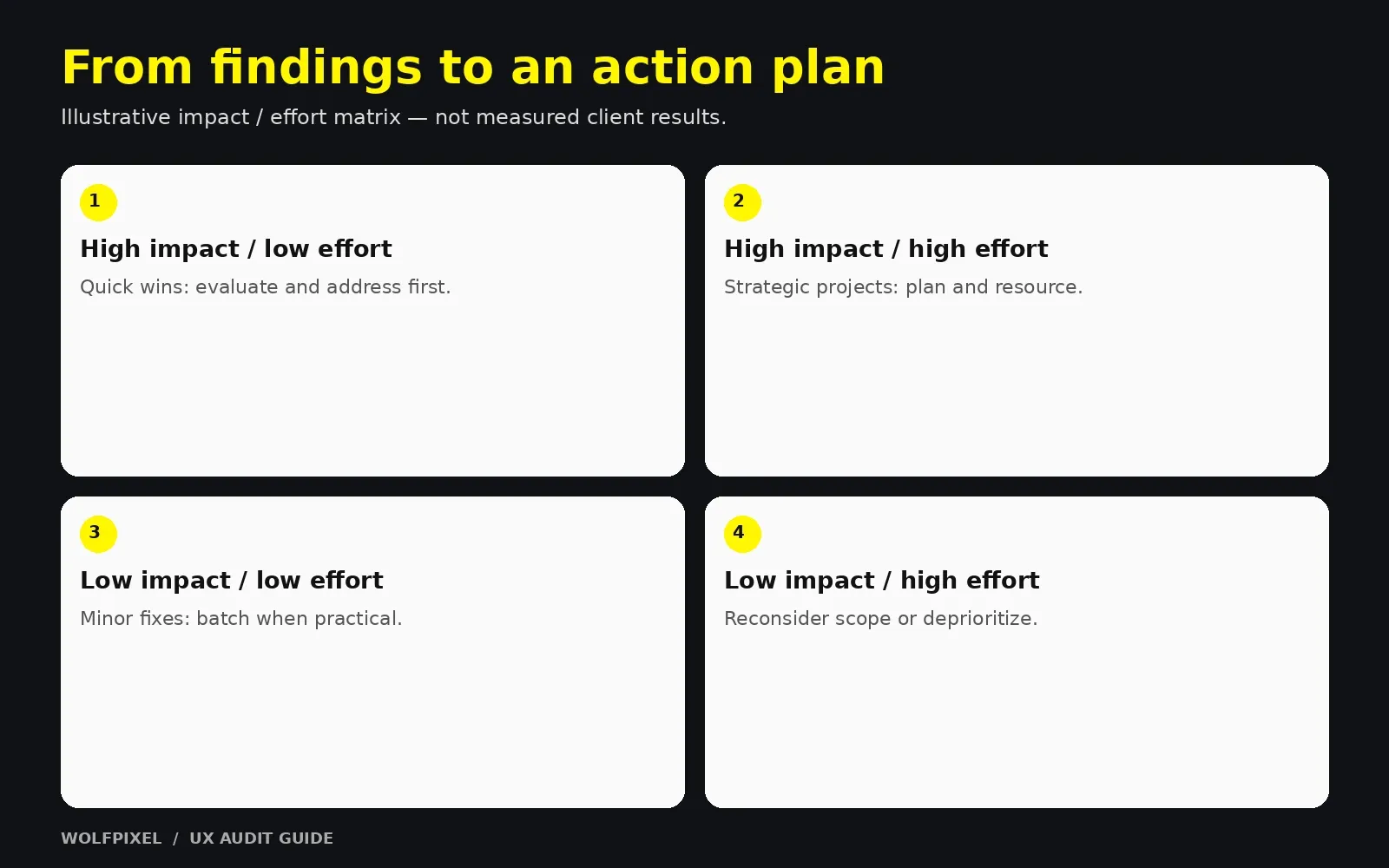
Prioritization matrix
Impact and effort prioritization matrix
| Impact | Low effort | High effort |
|---|---|---|
| High impact | Quick wins — do first | Strategic projects — plan next |
| Low impact | Minor fixes — batch later | Deprioritize or skip |
“
KEY TAKEAWAY
Lead the executive summary with a short, evidence-backed priority list.
In-House vs. Professional UX Audit: Investment, Evaluation Criteria, Risks, and Common Mistakes
In-house vs. professional support
In-house and professional audit considerations
| Factor | In-house audit | Professional UX audit |
|---|---|---|
| Cost | Lower direct cost; uses internal time | Direct investment in external expertise |
| Objectivity | Risk of bias and familiarity blindness | Fresh, outside-in perspective |
| Product knowledge | Deep | Needs onboarding time |
| Methodology | Depends on team experience | Usually structured and repeatable |
| Speed | Competes with other priorities | Dedicated, time-boxed focus |
| Best for | Mature design teams, small targeted reviews | Growth-critical flows, pre-redesign, teams without senior UX capacity |
Many teams get the best results from a hybrid: an experienced external lead runs the audit while internal designers and PMs contribute product context and take ownership of implementation.
Investment considerations
Pricing for a professional UX audit varies widely, so it’s more useful to understand what drives the cost than to rely on a single number:
- Scope: A single funnel costs far less than a full website UX audit across multiple platforms.
- Methods included: Expert review alone vs. expert review plus usability testing, accessibility audit, and analytics deep dive.
- Product complexity: Multi-role SaaS dashboards take longer than a marketing site.
- Deliverables: Issue log only vs. full report, prioritized roadmap, redesign concepts, and presentation workshops.
- Seniority of the team: Senior practitioners typically cost more but tend to produce sharper, more business-relevant prioritization.
How to think about ROI: Compare the audit’s cost with the value of the flow being reviewed. If a checkout, signup, or demo-request flow drives meaningful revenue, even modest improvements can justify the investment. Ask the provider how they’ll help you measure results after fixes ship.
Evaluation criteria: how to choose a UX audit partner
- Relevant experience: Have they audited products similar to yours (SaaS, ecommerce, fintech, mobile)?
- Clear methodology: Can they explain how they combine heuristics, data, and user validation?
- Sample work: Can they share an anonymized UX audit report example?
- Business orientation: Do they tie findings to your goals, not just design principles?
- Prioritization: Do they rank issues by impact and effort?
- Actionable output: Will engineers and designers be able to work directly from the report?
- Collaboration: Will they involve your team, interview stakeholders, and present findings live?
- Follow-through: Do they offer implementation support or post-launch review?
Risks to be aware of
- Opinion-driven findings with no evidence behind them
- Too broad a scope, producing a shallow review of everything
- No access to data, limiting the audit to guesswork
- Report overload, with hundreds of issues and no priorities
- No ownership after delivery, so the report never turns into work
Common UX audit mistakes to avoid
- Starting without clear goals. Without a defined outcome, findings can’t be prioritized.
- Auditing only the desktop experience. Many users arrive on mobile; audit the devices your audience actually uses.
- Relying only on heuristics. Expert review needs backing from analytics, recordings, or testing.
- Confusing personal taste with usability. “I don’t like this color” is not a finding.
- Ignoring accessibility. It affects real users and carries legal and reputational risk.
- Listing problems without solutions. Every finding needs a clear recommendation.
- Skipping prioritization. An unranked list overwhelms teams and stalls action.
- Not involving stakeholders. Teams that aren’t part of the process are less likely to act on it.
- Treating the audit as a one-time event. Products change; key flows deserve periodic review.
- Not measuring results. Without before-and-after metrics, you can’t prove what worked.
“
KEY TAKEAWAY
Assign owners and next steps so the report becomes implementation work.
Explore our UI/UX design services, review Wolfpixel’s product design case studies, or discuss your UX audit scope.
For Chicago teams turning audit findings into a redesign brief, our guide to choosing a UI design partner in Chicago helps compare relevant work, validation plans and implementation support before commissioning the next phase.
When estimating follow-up implementation, see our UI/UX design cost guide and confirm the actual scope with the team.
How long does a UX audit take?
Timing depends on scope, access to data and recruitment. For planning, allow roughly a week for a tightly focused review and several weeks for a broader audit with user testing; confirm the schedule against actual deliverables.
How often should you run a UX audit?
Review important flows after major releases, redesigns or meaningful changes in user behavior. Set a recurring review cadence that fits how quickly your product changes.
Can you do a UX audit without user testing?
Yes. An expert review combined with analytics and customer feedback can uncover many important issues. However, adding even a small round of usability testing increases confidence that you’re fixing the problems that matter most to users.
What tools are commonly used for a UX audit?
Teams typically use a mix of analytics platforms, session recording and heatmap tools, accessibility checkers, usability testing platforms, and a design or whiteboard tool such as Figma for annotating screens and mapping journeys. The right mix depends on your product and existing stack.
Is a UX audit worth it for an early-stage startup?
Often, yes — as long as it’s tightly scoped. Early-stage teams benefit most from a lightweight audit of onboarding and activation, where small fixes can meaningfully influence whether new users stick around.
What's the difference between a UX audit and a UI audit?
A UI audit focuses mainly on visual consistency, components, and design system quality. A UX audit is broader, covering usability, flows, content, accessibility, and how the experience supports user and business goals.
Turn user friction into a clear action plan
Share the journeys you want to improve. We can discuss the scope, evidence and design work needed to prioritize the next steps.

Was this article helpful?

Written by
Maniruzzaman Jubayer
Co-founder & COO | Product Design Specialist at Wolfpixel
Maniruzzaman Jubayer is the Co-founder & COO of Wolfpixel and a product design specialist with 7 years of experience. He personally oversees website, app, dashboard and digital product design at Wolfpixel. In this article, he focuses on UX evaluation, identifying friction and prioritizing practical interface improvements.
View all articles